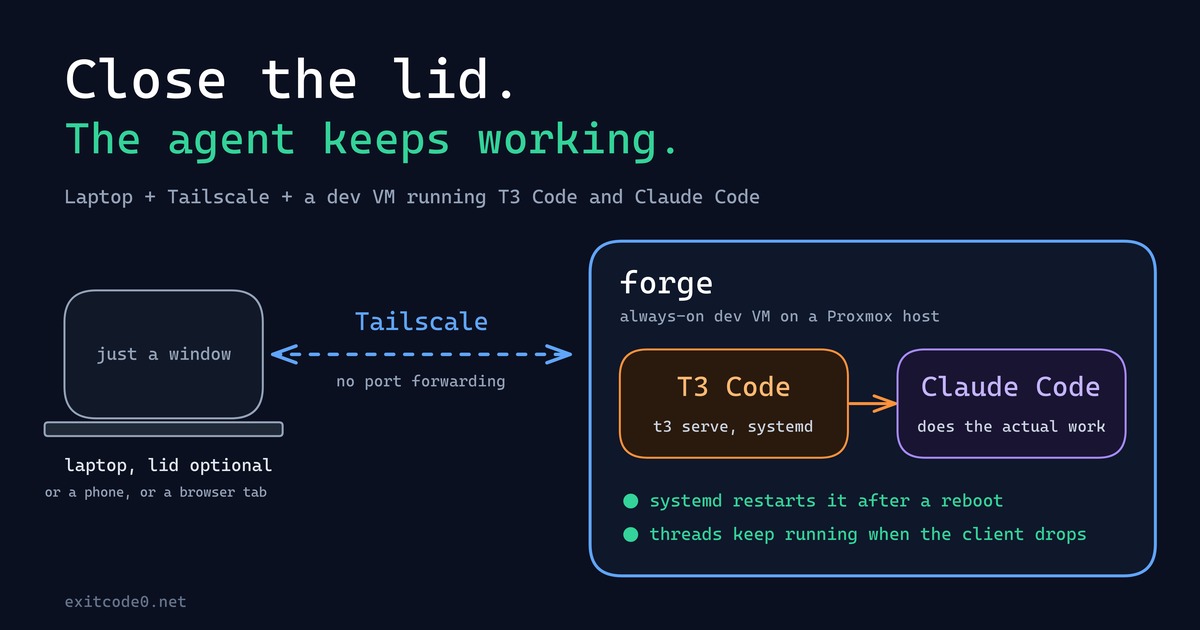
Diagram showing a laptop connecting over Tailscale to a persistent dev VM running T3 Code and Claude Code

How I Turned My Laptop Into a Dumb Terminal With a Tailscale Dev VM, T3 Code, and Claude Code

For about as long as I’ve been doing this, my laptop has been the computer: the IDE, the Docker daemon, forty browser tabs, all of it running locally, all of it dying the second the battery does or the lid has to close for a meeting. That model finally broke this year - not because of some clever trick, but because I moved the actual computer off the laptop entirely. The laptop’s job now is to open a window onto a machine that never sleeps, never loses its state, and honestly doesn’t care what OS it’s running. ...

24 September 2026 · 9 min · Tom

Running Ollama in a Proxmox LXC with NVIDIA GPU Passthrough

Running large language models locally is genuinely useful — no API costs, no rate limits, and your data stays on your own hardware. The catch is getting GPU acceleration working inside a Proxmox LXC container, which involves a few non-obvious steps around driver installation and cgroup device passthrough. Why LXC and not a VM? VM GPU passthrough wasn’t an option here — no iGPU meant the host would have had no display output once the card was handed off. LXC was the practical solution, and it turns out to be a good one anyway: containers share the host kernel directly, so the GPU stays bound to the host’s NVIDIA driver and the container accesses it via bind-mounted device nodes and cgroup permissions. On top of that, LXCs are lighter weight than VMs, with less overhead and near-instant startup times. For a dedicated service like Ollama, it’s a solid fit. ...

22 March 2026 · 8 min · Tom

How to Migrate VMs Between Standalone Proxmox Nodes Without Clustering

Moving virtual machines between Proxmox hosts is straightforward when you have a cluster configured, but what if you’re running standalone nodes? This guide walks through the process of migrating VMs between two independent Proxmox servers on the same network, without needing to set up clustering. [IMAGE: Diagram showing two Proxmox servers on a flat LAN with an arrow indicating VM migration between them] I recently needed to migrate several VMs from an older Proxmox host to a newer one with faster storage. Both systems were on the same network but not clustered, and I wanted to avoid the overhead of downloading backup files through the GUI. The solution? Streaming backups directly over SSH using Proxmox’s built-in vzdump tool. ...

15 February 2026 · 7 min · Tom