A long tweet about T3 Code’s telemetry went round this week. I run T3 Code all day, so I checked the build on my own server, turned the telemetry off in two places and confirmed nothing was leaving. It took about twenty minutes, and most of that was reading the binary.
Short version: set
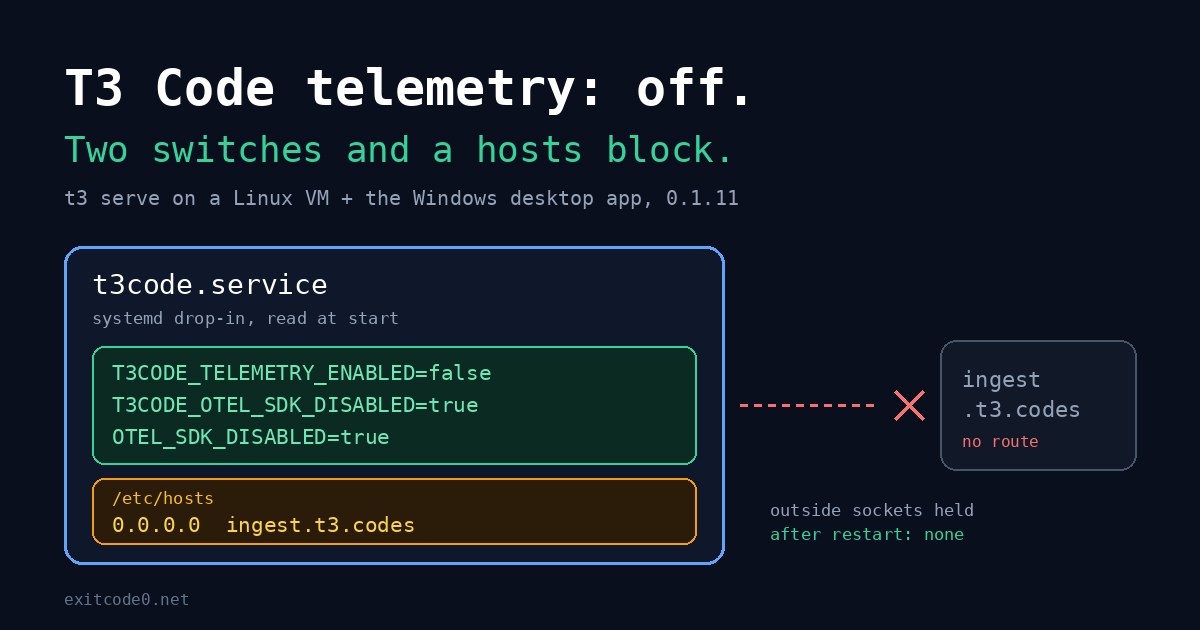
T3CODE_TELEMETRY_ENABLED=falseandT3CODE_OTEL_SDK_DISABLED=truein the environment of whatever starts T3 Code, pointingest.t3.codesat0.0.0.0in the hosts file as a backstop, restart, and check the process. On Linux that’s a systemd drop-in. On Windows it’s two user environment variables and a full quit of the desktop app.
The tweet, and why I’m not weighing in
This is the one that started it. The original is in Chinese, so here’s the opening in English, machine-translated:
Lately a lot of people on X have been pushing T3 Code, the open-source project from @theo, and hyping it as a free, open-source, local AI coding tool.
I went through its source code from top to bottom, and it sent a chill down my spine. This isn’t open source with a conscience. It’s blatant data harvesting.
It starts in March this year. On 6 March, T3 Code merged PR #174, which put PostHog in, switched on by default…
The full post runs a good deal longer, with screenshots, and X’s own translate link handles the rest. There’s been a lot of quote-tweeting since, and a fair amount of it is about personalities. I’ve no interest in that part. T3 Code is the most useful tool I’ve added to my workflow this year and I’m going to keep using it. I also want my dev box to be private. Both can be true, and the second one is a config problem I can fix myself.
So this post skips the argument and covers what the software does, how to switch it off, and how to check.
The setup this applies to
If you’ve read the dumb terminal post, you know the shape. A small always-on VM called forge runs t3 serve as a systemd service, bound to its Tailscale address. My laptop, phone and desktop are windows onto it. The agents, the projects and the threads all live on the VM.
The unit file is short:
[Service]
Type=simple
User=you
ExecStart=/home/you/.npm-global/bin/t3 serve --mode web --host 100.64.0.10 --port 3773 --no-browser
Restart=on-failure
I don’t use T3 Connect, the account-based relay. Devices reach the server directly over the tailnet. That matters later, because some of T3’s telemetry only exists on the Connect path.
There’s a second install in the house. The Windows desktop on my desk, the one that reads Claude’s replies aloud, runs the T3 Code desktop app, which bundles its own copy of the server. That one needs the same treatment.
Check the binary before you trust a tweet or a doc
I didn’t want to act on a tweet, and I didn’t want to act on a README either. The server on disk is the thing that runs, so that’s what I read.
One gotcha first. The npm package is a launcher, about 32 KB. Grepping node_modules/t3 finds nothing. The real server is a single compiled file that the launcher downloads:
ls -la ~/.t3/runtime/versions/
# 0.1.11/t3  is about 170 MB
Pull the switch names and the endpoints out of it:
B=~/.t3/runtime/versions/0.1.11/t3
grep -a -o -E 'T3CODE_[A-Z0-9_]+' $B | sort -u | grep -E 'TELEMETRY|OTEL|POSTHOG'
grep -a -o -E 'https?://[a-zA-Z0-9.-]*(t3\.codes|posthog\.com|axiom\.co)[a-zA-Z0-9/._-]*' $B | sort -u
Here’s what the 0.1.11 build has in it. I read the same things in 0.1.9 before updating, and they match.
- Telemetry is on unless you turn it off. The config reads
T3CODE_TELEMETRY_ENABLEDwith a default oftrue. - Events go to
https://ingest.t3.codes/batch/. The server buffers events and flushes them every 10 seconds. Each batch carries a distinct ID, an install ID, platform, architecture, T3 version and server mode, plus the event properties. - The identity code reads two files from your home directory.
~/.codex/auth.jsonand~/.claude.json. If it finds a Codex account ID or a Claude user ID, the distinct ID on every event is the SHA-256 of that value, with no salt. If it finds neither, it uses a hash of a random install ID. A second function hashes the T3 Connect user, the OpenAI user ID and the Claude account UUID as “owners” of the install. - Relay traces go to Axiom. There’s a build-time endpoint at
us-east-1.aws.edge.axiom.co. The code skips it when telemetry is off or when OpenTelemetry export is disabled.
T3’s own telemetry docs list what the events contain: provider, model, reasoning effort, permission mode, turn results, duration and token counts. They say prompts, responses, file contents and tokens are never sent, and I found nothing in the binary that contradicts that.
Note: The provider account hashing is already gone upstream. PR #42299, “analytics no longer reads or sends Codex and Claude account IDs”, landed on
mainon 24 November 2026, and the docs onmainnow say events carry no provider account identifiers. Release 0.1.11 came out on 20 November and still has the old code, so the current stable build reads both files. Nightlies from 24 November onward shouldn’t. I haven’t run one to check.
I didn’t go through the history the tweet describes, the old homepage wording or who said what. The PR and issue numbers it cites are real, and I’ve linked them further down.
Layer 1: turn it off in the service
The supported switch is an environment variable, so on a systemd box it belongs in a drop-in. Leave the unit file alone and add this:
sudo mkdir -p /etc/systemd/system/t3code.service.d
sudo tee /etc/systemd/system/t3code.service.d/10-no-telemetry.conf >/dev/null <<'EOF'
[Service]
Environment=T3CODE_TELEMETRY_ENABLED=false
Environment=T3CODE_OTEL_SDK_DISABLED=true
Environment=OTEL_SDK_DISABLED=true
EOF
sudo systemctl daemon-reload
systemctl show t3code.service -p Environment
What each one does in the code:
T3CODE_TELEMETRY_ENABLED=falsestops product events and relay tracing.T3CODE_OTEL_SDK_DISABLED=trueturns off OpenTelemetry export. It acceptstrue,yes,on,1ory.OTEL_SDK_DISABLED=trueis the standard OpenTelemetry name for the same thing. T3 only recognises the literal stringtruehere, and warns if you give it anything else.
The first variable is enough on its own. I set all three because they’re free and an update might change which one a code path reads.
If you run t3 serve from a shell instead of systemd, export the same variables in the profile of the user that starts it.
Layer 2: block the endpoint in the hosts file
A switch only works while the software honours it. A hosts entry doesn’t depend on that.
sudo cp -a /etc/hosts /etc/hosts.bak-$(date +%F)
sudo tee -a /etc/hosts >/dev/null <<'EOF'

# T3 Code telemetry block
0.0.0.0 ingest.t3.codes
:: ingest.t3.codes
0.0.0.0 us-east-1.aws.edge.axiom.co
:: us-east-1.aws.edge.axiom.co
EOF
This takes effect straight away, before any restart:
curl -sS -m 5 -o /dev/null https://ingest.t3.codes/batch/
# curl: (7) Failed to connect to ingest.t3.codes port 443 after 0 ms: Could not connect to server
Add both the IPv4 and IPv6 lines. ingest.t3.codes has AAAA records as well as A records, and a 0.0.0.0 line alone leaves the IPv6 route open.
I left relay.t3.codes and app.t3.codes alone. They’re T3 Connect and the hosted app, I don’t use either, and the server held no connections to them.
Note: The Axiom hostname is a shared regional endpoint. If something else on the box sends traces to Axiom in that region, leave that pair of lines out and rely on the environment variables.
Restarting T3 from inside T3
The environment only changes when the service restarts. My terminal for doing that is an agent thread running inside the service, so a plain systemctl restart kills the session that issued it.
The way round it is a transient systemd unit, which lives outside the service’s cgroup. I had it restart T3 and then write down what the new process looks like:
cat > ~/bin/t3-telemetry-check.sh <<'EOF'
#!/bin/bash
OUT=/home/you/t3-telemetry-check.txt
systemctl restart t3code.service
sleep 45
{
  date -Is
  systemctl is-active t3code.service
  PID=$(pgrep -f 'runtime/versions/.*/t3 serve' | head -1)
  tr '\0' '\n' < /proc/$PID/environ | grep -E '^(T3CODE_TELEMETRY_ENABLED|T3CODE_OTEL_SDK_DISABLED|OTEL_SDK_DISABLED)='
  echo "non-local sockets held by the server:"
  ss -tnpH | grep "pid=$PID," | awk '{print $5}' | grep -v -e '^100\.' -e '^127\.' -e '^\[::1\]' || echo "none"
} > "$OUT" 2>&1
EOF
chmod +x ~/bin/t3-telemetry-check.sh
sudo systemd-run --on-active=90 --unit=t3code-telemetry-restart ~/bin/t3-telemetry-check.sh
Ninety seconds gives the agent time to finish its reply before the floor goes. The app reconnects on its own once the service is back.
The grep -v drops tailnet and loopback addresses, which is where my own devices connect from. Adjust it if yours come in over a LAN range.
Proving it’s off
The file it wrote:
2026-11-25T05:06:12+00:00
active
T3CODE_TELEMETRY_ENABLED=false
T3CODE_OTEL_SDK_DISABLED=true
OTEL_SDK_DISABLED=true
non-local sockets held by the server:
none
T3 also says so itself at startup:
journalctl -u t3code --since '-10 min' | grep -i telemetry
# WARN: T3CODE_OTEL_SDK_DISABLED is set, so no telemetry is exported, whatever configured it
Two limits on that evidence. The socket check is a snapshot, so a connection that opens and closes between samples wouldn’t show. That’s what the hosts block is for. And none of this touches data sent before today. Whatever the server reported while telemetry was on is already at the other end.
The Windows desktop app
The desktop app is an Electron shell with a full server bundled inside, in resources\server.asar. That bundled server does the sending, and it reads the same variables. I copied the shell’s own bundle, app.asar, over to the VM and searched it. It has no ingest or Axiom address in it, and it does reference T3CODE_TELEMETRY_ENABLED.
T3’s docs say to set the opt-out as a user environment variable on Windows. In PowerShell, no admin needed:
[Environment]::SetEnvironmentVariable('T3CODE_TELEMETRY_ENABLED','false','User')
[Environment]::SetEnvironmentVariable('T3CODE_OTEL_SDK_DISABLED','true','User')
[Environment]::SetEnvironmentVariable('OTEL_SDK_DISABLED','true','User')

Get-ItemProperty HKCU:\Environment |
  Select-Object T3CODE_TELEMETRY_ENABLED,T3CODE_OTEL_SDK_DISABLED,OTEL_SDK_DISABLED
Then quit T3 Code completely and open it again. Closing the window isn’t enough. A running process keeps the environment it started with, and mine had five T3 Code (Beta).exe processes that had been up for three days. Check they’ve all gone before you relaunch:
Get-Process 'T3 Code (Beta)' -ErrorAction SilentlyContinue
This is the trap behind issue #42351, where someone on 0.1.11 had the variable saved and still saw two POSTs to ingest.t3.codes, because the running processes didn’t have it.
I left the hosts file alone on this machine. If you want the backstop there too, the same four lines go in C:\Windows\System32\drivers\etc\hosts from an admin editor.
Note: I’ve set the variables and confirmed they’re saved. I haven’t captured the desktop app’s traffic after a relaunch, so the Windows side rests on the code reading, not on a packet trace.
After every update
An update replaces the binary, and a renamed switch would fail silently. Before restarting onto a new version, I check that the two names and the endpoint list haven’t moved:
B=~/.t3/runtime/versions/<new-version>/t3
grep -a -c -e 'T3CODE_TELEMETRY_ENABLED' -e 'T3CODE_OTEL_SDK_DISABLED' $B
grep -a -o -E 'https?://[a-zA-Z0-9.-]*(t3\.codes|posthog\.com|axiom\.co)[a-zA-Z0-9/._-]*' $B | sort -u
t3 --version downloads the new binary without restarting the service, so you can run this while the old version is still serving.
I did exactly this going from 0.1.9 to 0.1.11 the same morning. Both switches, the default ingest host and the endpoint list were identical. A new hostname in that second command would mean a new line in the hosts file.
What this doesn’t cover
The server opt-out is narrower than it sounds. T3’s telemetry docs list several things it doesn’t touch.
- The mobile app. Crash reports and connection traces have their own toggles under Settings, About T3 Code, Diagnostics. Server variables don’t affect them. For the phone, a DNS-level block of the two hostnames on your home network covers it while you’re on that network. I use Pi-hole for that sort of thing.
- The hosted web app. The docs say it has no tracing toggle. A browser pointed at your own
t3 servefollows your server’s setting instead. - Publish agent activity. If you’ve enabled it for mobile notifications, the host sends project and thread titles to the T3 Connect relay. It’s a separate setting under Sharing & access, and the telemetry opt-out doesn’t change it.
- The model manifest fetch. At startup the server downloads a model list from
raw.githubusercontent.com. That isn’t telemetry, but it is an outbound request. Issue #36479 covers it, and"enableProviderUpdateChecks": falseinsettings.jsonstops it.
A third layer: the managed policy
T3 has a supported way to lock telemetry off for every user on a machine, which survives someone clearing an environment variable. On Linux it’s a JSON file at /etc/t3code/policy.json:
{
  "schemaVersion": 1,
  "organization": "Homelab",
  "limits": {
    "telemetry": false
  }
}
Validate it before you put it anywhere, because T3 refuses to start with a policy it can’t parse:
t3 policy check policy.json
Managed by Homelab (policy.json, fingerprint 661101722109).

No managed settings.

Limits:
{
  "telemetry": false
}
That check passes on 0.1.11. I haven’t deployed the file yet, so I can’t tell you how the app behaves with it loaded. On Windows the same JSON goes in C:\Program Files\T3Code\policy.json. The managed policy docs have the rest, including t3 policy show to confirm the running server picked it up.
The GitHub issues, if you want the history
I checked each of these exists and says what it’s claimed to say, a habit I picked up after a subagent invented a quote on me. Read them and make up your own mind.
How it got here
- PR #174, merged 6 March 2026, added PostHog telemetry.
- PR #15028, merged 18 October 2026, routed events through
ingest.t3.codes. - PR #21506, merged 20 October 2026, added the stable install ID and the owner hashing.
Requests for an opt-out
- Issue #1397 asked for a settings toggle. It was closed as not planned on 23 June 2026 with the reply “We will not make this easier to opt out of, it is crucial for us to know how many users we have”.
- Issue #4123 raised the gap between the old homepage wording and the default. Closed 4 November 2026.
- Issue #42283, opened and closed 24 November 2026, asked for disclosure and consent controls and was redirected to Discussions.
- Four community PRs added a toggle and were closed unmerged: #13458, #16763, #21248 and #27077.
Bugs that affect whether the opt-out works
- Issue #42351: on Windows, running processes can lack a saved opt-out. Fully quit and relaunch. Closed 24 November 2026.
- Issue #37772: on macOS, the desktop app decided relay tracing before it had read the login shell, so an opt-out in
~/.bash_profilewas ignored for traces. The workaround in the issue islaunchctl setenv T3CODE_TELEMETRY_ENABLED false. A systemd service isn’t affected, because the variable is in the process environment from the start. Closed 16 November 2026. - Issue #36479: the model manifest fetch. A commenter there also reports a second lookup from the Usage page that the setting doesn’t stop.
- PR #42299, merged 24 November 2026: analytics stops reading and sending the Codex and Claude account IDs. Not in a stable release yet.
Troubleshooting
The variables are in the drop-in but not in the process. You haven’t restarted, or you forgot daemon-reload. Compare systemctl show t3code.service -p Environment with tr '\0' '\n' < /proc/<pid>/environ. Check the PID of the compiled t3 child, not the Node launcher above it.
T3 warns that OTEL_SDK_DISABLED was read as false. You set it to 1 or yes. The standard variable only takes true. Use T3CODE_OTEL_SDK_DISABLED for the looser spellings.
ss still shows a connection to a Cloudflare address. Look at which hostname it belongs to before worrying. The model manifest and GitHub PR sync both make outbound requests that have nothing to do with telemetry.
The Windows app still has the old environment. A tray or background process survived. Kill every T3 Code (Beta).exe, then launch from the Start menu so it inherits the current user environment.
T3 won’t start after adding a policy file. It refuses to run with a policy it can’t enforce. Run t3 policy check on the file, or move it out of /etc/t3code/ and restart.
Twenty minutes, then back to work
The useful part of that tweet was the two variable names at the very bottom. Everything above them is an argument I don’t need to be in. My server now has the switch off, the endpoint unroutable and a text file that says the process holds no outside connections, and the desktop is one relaunch away from the same. T3 Code went straight back to doing what I use it for.
Or just hand this page to your agent
If you run T3 Code with an agent on the same box, it can do all of this for you.
Read https://exitcode0.net/posts/t3-code-disable-telemetry-linux-windows/ and set up the same T3 Code telemetry opt-out on this machine. First find how T3 Code is started here (systemd unit, shell, or desktop app) and which version is installed, then check the installed binary still uses the variable names and hostnames from the post. Show me the drop-in and the hosts lines before you write them, and back up /etc/hosts first. Ask me before blocking the Axiom hostname, in case something else here uses it. Do not restart T3 Code directly if you are running inside it: schedule the restart the way the post does and tell me when the connection will drop. Afterwards, show me the process environment and its outside sockets.
The page gives the agent the variable names, the drop-in, the hosts lines, the restart script and the checks. It doesn’t know how your T3 is launched, which user runs it, whether you use T3 Connect, or which address ranges count as local on your network.
Give it five minutes and you’ll have your own t3-telemetry-check.txt to read.
Enjoy. ✌️