I built a small Python TUI to help manage power consumption on my aging Dell laptop. The battery is at 37% health - 18,992 mWh left from a 51,999 mWh design capacity - and the Windows power settings are buried three menus deep. Nothing complicated: a couple of hundred lines using Textual and psutil, showing real-time discharge rates from WMI and letting me cap the CPU speed without clicking through Settings every time.
The tool itself was a weekend job. Setting up the GitHub repo took longer, because the week I was building it, a supply chain attack called Mini Shai-Hulud was making the rounds - and it changed how I thought about even small personal projects.
What is Mini Shai-Hulud?
Mini Shai-Hulud is a supply chain attack disclosed in May 2026, documented by researchers at Socket and SafeDep and picked up by NHS Digital’s Cyber Security Operations Centre (advisory CC-4781). Attackers published hundreds of malicious versions of legitimate, widely-used packages to both npm and PyPI in two waves - 29 April and 11 May 2026.
The compromised packages included names you’d recognise. On the Python side: mistralai==2.4.6 and guardrails-ai==0.10.1. On the npm side: @tanstack/react-router, @mistralai/mistralai, @opensearch-project/opensearch, and several others. These aren’t obscure libraries pulled in by one niche project. Mistral AI’s Python client is used across a significant chunk of the AI tooling ecosystem - including by anyone running local LLM workflows who has also wired up the API client. The npm side of the same attack is what pushed me to write a dependency audit extension for Pi Agent.
What made this attack particularly nasty:
- The malicious payloads were heavily obfuscated and triggered on installation or import - not just at runtime. You didn’t have to run the code for it to execute.
- Once active, the malware harvested GitHub tokens, npm tokens, CI/CD secrets, cloud credentials, and API keys from the compromised environment.
- If the compromised environment had permission to publish other packages, the malware injected itself into those too - a self-spreading worm that could propagate laterally across the open-source ecosystem.
The name is a Dune reference. The real sandworms are the unpinned installs silently pulling whatever “latest” means today.
The core problem: pip install textual is not a version
When you write pip install textual or list textual without a version in your requirements.txt, pip fetches whatever the current release is at install time. Fine for exploring a library. A liability when:
- A compromised version is published to PyPI - as happened with Mini Shai-Hulud
- A new release of a dependency introduces a CVE that didn’t exist when you first tested
- Someone else clones the repo six months later and installs a different set of packages than you did
The fix is pinning exactly: specify the precise version of every package, including transitive (indirect) dependencies your direct deps pull in. Not a range. Not >=. Exact.
For the battery TUI, that’s just two packages:
textual==8.2.6
psutil==7.2.2
If you’re starting from an existing working environment, freeze it:
pip freeze > requirements.txt
pip freeze captures everything - direct and transitive - at the exact versions currently installed. That file becomes your contract: this is the environment the project was tested against.
Note: Run
pip freezeinside a virtual environment, not your global Python install. A global freeze picks up every package you’ve ever installed. I covered setting up isolated Python environments in Python Development in Docker Containers - the venv principle is the same, just without Docker.
pip-audit: checking pinned deps for known CVEs
Pinning solves the “surprise update” problem. It doesn’t tell you whether your pinned version has a known CVE. That’s what pip-audit is for.
pip install pip-audit
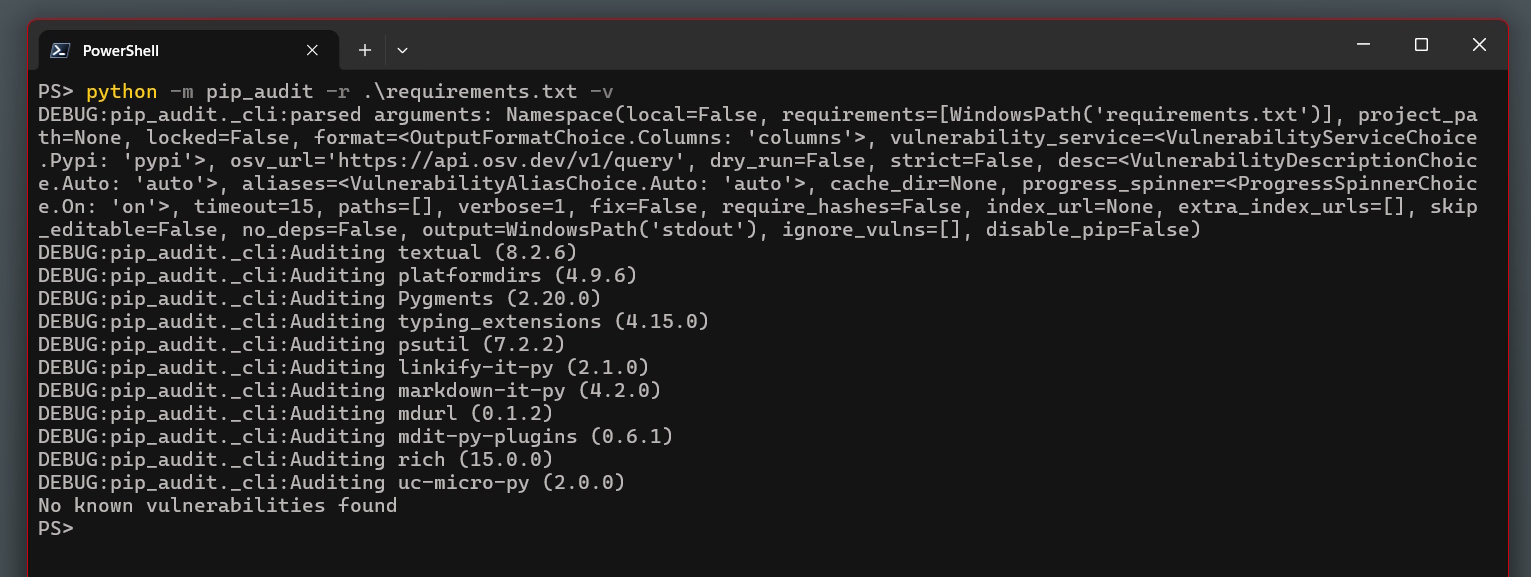
pip-audit -r requirements.txt
A clean run looks like:
No known vulnerabilities found
pip-audit queries the OSV (Open Source Vulnerabilities) database - the same source used by GitHub’s dependency scanning - and reports any CVEs in your pinned packages. Run it before you commit whenever you update a version. It’s fast and free, and it would have flagged mistralai==2.4.6 the moment that CVE was published.
GitHub Actions: the security audit in CI
Running pip-audit locally before commits is better than nothing. Automating it in CI catches CVEs that are published after you pinned the version - which is exactly the scenario Mini Shai-Hulud creates. You pin mistralai==2.4.6 in January because it’s clean. In May, the CVE drops. Without scheduled CI, your “no known vulnerabilities” assurance is six months stale.
Here’s the workflow I’m using (.github/workflows/security-audit.yml):
name: Security Audit

on:
  push:
    branches: [main]
  pull_request:
  schedule:
    - cron: '0 8 * * 1'  # Every Monday at 08:00 UTC

permissions:
  contents: read

jobs:
  pip-audit:
    name: Dependency CVE Audit
    runs-on: ubuntu-latest

    steps:
      - name: Checkout
        uses: actions/checkout@v6

      - name: Set up Python
        uses: actions/setup-python@v6
        with:
          python-version: '3.13'
          cache: pip

      - name: Install pip-audit
        run: pip install pip-audit==2.9.0

      - name: Audit pinned dependencies
        run: pip-audit -r requirements.txt --progress-spinner off --strict

  syntax:
    name: Syntax Check
    runs-on: ubuntu-latest

    steps:
      - name: Checkout
        uses: actions/checkout@v6

      - name: Set up Python
        uses: actions/setup-python@v6
        with:
          python-version: '3.13'

      - name: Compile check
        run: python -m py_compile battery_tui.py && echo "Syntax OK"
A few decisions in here that are worth unpacking:
permissions: contents: read
By default, a GitHub Actions runner token has write access to the repository. A security audit workflow has no reason to push anything. Setting permissions: contents: read applies the principle of least privilege: if something in your CI chain is ever compromised, it can’t write to your repo.
This isn’t theoretical. CI token harvesting was exactly what Mini Shai-Hulud was doing - it targeted GitHub tokens specifically because they’re present in almost every developer’s environment. A compromised CI step with write permissions could push code, create releases, or modify other repos the token has access to.
pip install pip-audit==2.9.0
Pin your audit tool. pip-audit is itself a dependency, and the supply chain problem applies recursively. An unpinned pip install pip-audit in your CI pulls whatever the latest release is - if that were ever compromised, your security audit would be the attack vector. Pinning the tool closes that loop.
--strict
Fails the job on any CVE finding, regardless of severity. CVSS scores are imprecise, and for a small project there’s no reason to knowingly ship a vulnerable dependency at any level.
schedule: cron: '0 8 * * 1'
The Monday run is the important one. Even if you don’t push code for a month, the workflow still runs and still catches any CVE published against your pinned versions since you last touched the project. Without this, a project you haven’t touched becomes progressively more vulnerable without any signal.
Dependabot: automated version update PRs
Dependabot is GitHub’s built-in dependency bot. You configure it with .github/dependabot.yml and it opens pull requests when your pinned versions have newer releases available.
version: 2

updates:
  - package-ecosystem: pip
    directory: /
    schedule:
      interval: weekly
      day: monday
      time: "09:00"
      timezone: Europe/London
    groups:
      all-deps:
        patterns:
          - "*"
    commit-message:
      prefix: "chore(deps)"

  - package-ecosystem: github-actions
    directory: /
    schedule:
      interval: weekly
      day: monday
      time: "09:00"
      timezone: Europe/London
    commit-message:
      prefix: "ci(deps)"
The second block - package-ecosystem: github-actions - is the part most people overlook. Your CI workflow uses actions/checkout@v6 and actions/setup-python@v6. Those are versioned packages published to the GitHub Marketplace. They can have vulnerabilities. Dependabot watches them exactly as it watches pip packages.
The groups config bundles all pip updates into a single PR rather than one per package. For a two-dependency project it barely matters, but it’s good habit for anything bigger.
Critically: Dependabot opens PRs. It doesn’t merge them. You still review and approve. The bot is a prompt, not an autopilot. The workflow is: Dependabot opens a version bump PR → the CI audit runs on that PR → if it passes, you merge. The automation does the checking; you make the call.
Security alerts and automated security PRs
The dependabot.yml file handles version updates — weekly scans for newer releases. GitHub also has a parallel feature that most people miss: Dependabot alerts, which fires the moment a CVE is matched against any dependency in your current graph, regardless of whether you’ve pushed anything recently.
Enable both under Settings → Security & analysis:
- Dependabot alerts — GitHub emails you and flags the repo the instant a known vulnerability matches your dependency graph. No config file needed, just tick the box.
- Dependabot security updates — goes one step further. When a security alert fires and a patched version exists, Dependabot immediately opens a PR to fix it, without waiting for the weekly schedule.
The distinction matters in practice. Version update PRs are proactive hygiene — they arrive Monday morning regardless of threat landscape. Security update PRs are reactive incident response — they arrive hours after a CVE is published, because that’s when you need them. With both enabled, the full workflow is:
- Every Monday: Dependabot opens version bump PRs → CI audits → you review and merge at leisure.
- Any time a CVE drops: Dependabot opens a security PR immediately → CI audits → you merge fast.
Without security updates enabled, the CVE-to-fix gap is determined by your weekly schedule rather than how quickly you can respond. For something like Mini Shai-Hulud, where the attack hit in two waves a fortnight apart, the difference between “fixed within hours” and “fixed next Monday” is significant.
Branch protection: making the checks mandatory
Dependabot and CI mean nothing if something can push directly to main and skip the checks entirely. GitHub’s branch protection rules enforce that nothing merges without passing them.
Go to Settings → Branches → Add branch ruleset in your repo and apply these to main:
Require a pull request before merging - No direct pushes, including from you. Everything goes through a PR. This is what ensures CI runs before anything lands.
Require status checks to pass before merging - Add “Dependency CVE Audit” and “Syntax Check” as required checks. The PR cannot merge while CI is failing.
Require branches to be up to date before merging - Forces PRs to rebase on the latest
mainbefore the check results count. Prevents a security-clean PR merging over a later commit that introduced a problem.Do not allow bypassing the above settings - This one catches people out: by default, repo admins (i.e., you) can bypass protection rules. Tick this to apply them to everyone, including yourself.
For a solo project, requiring multiple reviewers is overkill. PR-only merges with required CI is the meaningful protection.
The status badge
Once the workflow is running, put the badge in your README:
[](https://github.com/YOUR_USERNAME/YOUR_REPO/actions/workflows/security-audit.yml)
It goes red if the audit finds a CVE. It’s a quick signal that the project is being actively monitored rather than set and forgotten.
Updating dependencies safely
When Dependabot opens a PR bumping a version, or you want to pull in a new release manually, the process is:
pip install --upgrade textual psutil
pip freeze > requirements.txt
pip-audit -r requirements.txt
Run the audit before committing. If clean, commit the updated requirements.txt. CI will audit again on the PR as a second check. Don’t upgrade and commit in one step - the whole point is that a new release might be the compromised one.
What this doesn’t solve
To be clear about the limits of this setup:
- Zero-days: pip-audit catches known CVEs against published packages. A compromised package executing on import happens before any audit can flag it. The defence against that is fast response: monitoring the OSV database, following advisories like NHS Digital CC-4781, and having an update workflow you can actually execute quickly.
- Your own code: pip-audit analyses your dependencies, not what you wrote. Code review and static analysis are separate concerns.
- Private registries: pip-audit queries OSV, which covers public PyPI. If you’re pulling from an internal feed, you need your own CVE integration.
For a personal side project running locally, this setup is proportionate to the risk. For anything with production credentials in CI or access to shared infrastructure, you’d also want secret scanning (GitHub has this built in under Security → Secret scanning), OIDC for cloud auth instead of stored tokens, and possibly SLSA provenance for anything you publish.
The broader point
Mini Shai-Hulud hit well-resourced teams - Mistral AI, TanStack, OpenSearch. They had proper engineering organisations and still got hit. The attack vector wasn’t a bug in their code. It was the trust model: pip install mistralai trusts PyPI, and PyPI had been compromised.
A two-dependency Python script might feel too small to bother hardening. But the GitHub token sitting in your Actions environment is real. If the environment is compromised, it’s the same token that could push to your repo, create API keys, or pivot to other repositories it has access to. Small projects with CI pipelines have the same token exposure as large ones.
The setup described here takes about 30 minutes to put in place. The CI workflow is 57 lines. The Dependabot config is 30 lines. Branch protection is four checkboxes. None of this is complicated - it’s just the stuff you learn the hard way if you skip it.
The battery TUI (and the full security setup in context) is on GitHub at Tombo1001/battery-extender. MIT licensed.