Last week, Microsoft’s Defender research team published details of an attack campaign they’re calling Mini Shai Hulud. A threat actor compromised maintainer accounts for the @antv npm organisation - the team behind popular charting libraries like G2 and G6 - and published malicious versions containing a 499 KB obfuscated payload that ran automatically during npm install. The blast radius was significant: echarts-for-react, one of the downstream dependents, has over a million weekly downloads. GitHub pulled 640 package versions and invalidated 61,274 npm tokens before it was contained.
I’d been planning to build a dependency audit extension for Pi Agent anyway. Reading through that report made it feel a bit more urgent.
This post covers what I built, how it works, and - importantly - where advisory-based scanning actually helps and where it doesn’t. Mini Shai Hulud is a good case study for the latter.
What’s a Supply Chain Attack, and Why Does npm Make Them Easy?
If you already know this, skip ahead. If you’ve heard the term and not quite understood it, here’s the short version.
When you install a package with npm install, you’re not just installing the code you asked for. You’re also installing everything that package depends on, and everything those packages depend on - a tree that can easily run to hundreds of packages for a single top-level dependency. Every node in that tree is a potential attack surface.
The attack doesn’t have to compromise the package’s source code. It can compromise the npm account of any maintainer in the tree. Once you control a maintainer account, you can publish a new version with malicious code added. Anyone whose project has that package as a (direct or transitive) dependency will pull in the backdoor the next time they run npm install.
Mini Shai Hulud used another trick on top of that: preinstall hooks. npm allows packages to declare shell commands that run automatically during installation - before you’ve even looked at the code. The attack payload executed the moment someone ran npm install in a project with the compromised packages.
That’s the important bit for what follows. The malicious code ran at install time, not at runtime. Your application never even had to launch.
What I Built
Pi Agent is a minimal terminal coding harness - think Claude Code but locally hosted against Ollama. I’ve written about its extension architecture previously; extensions are TypeScript modules that load at startup and can register tools, commands, and UI components.
The dep-audit extension I built does one thing: at startup, it queries the npm advisory database against every package installed under Pi’s own node_modules, and surfaces any known vulnerabilities directly in the Pi UI.
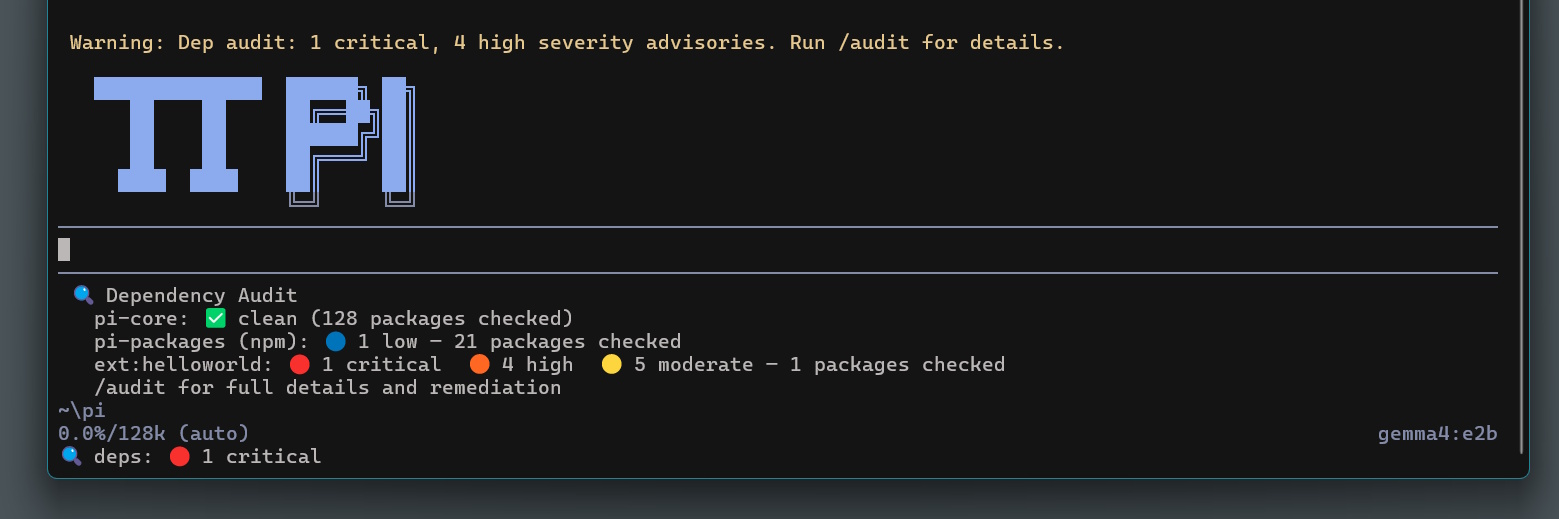
Here’s what it looks like in practice - a widget that appears below the editor pane on launch:
🔍 Dependency Audit
  pi-core: ✅ clean (312 packages checked)
  pi-packages (npm): 🔵 1 low - 45 packages checked
  /audit for full details and remediation
Running /audit expands into a full report in the conversation:
 #### 🔵 LOW (1)

 - @mozilla/readability
     - Installed: 0.5.0
     - Vulnerable versions: <0.6.0
     - Patched: >=0.6.0 (v0.6.0 published — ✅ 443d old)
     - Advisory reported: 420d ago
     - @mozilla/readability Denial of Service through Regex
     - CWE: CWE-1333
     - https://github.com/advisories/GHSA-3p6v-hrg8-8qj7
The patched version age is deliberate - I’ll explain why shortly.
Example Of A Harmful Package
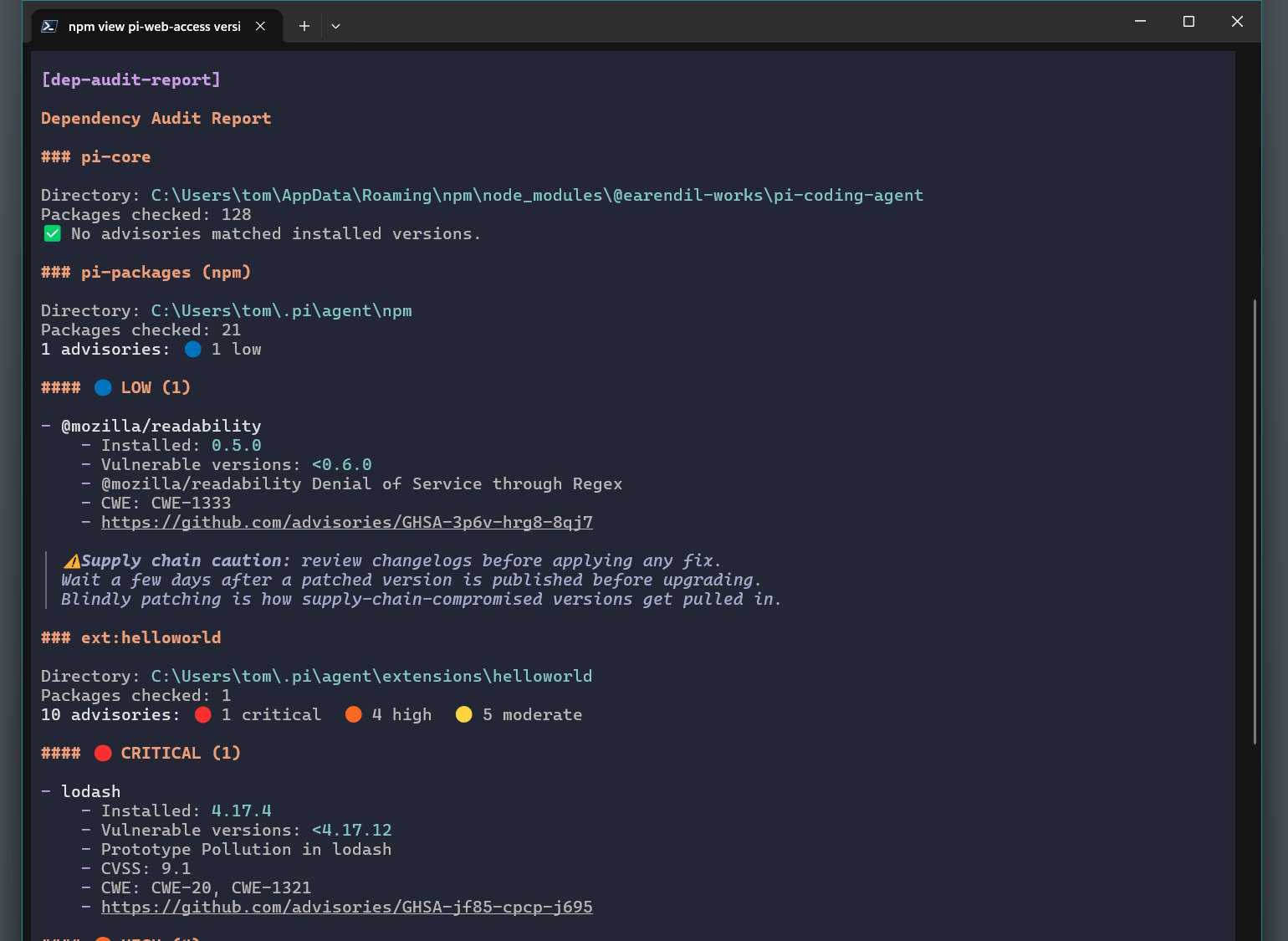
So that readability package seemingly isn’t going to bring down our entire operation, but what would a package with bad dependency health look like? Well, I built a cursed helloworld extension that would allow us to see:
{
  "name": "dep-audit-vuln-fixture",
  "version": "1.0.0",
  "description": "DEP-AUDIT TEST FIXTURE — lodash@4.17.4 pinned intentionally vulnerable for audit demo/testing",
  "dependencies": {
    "lodash": "4.17.4" //BAD THINGS HERE
  }
}
And here is how our audit extension presents the review of our problematic dependencies:
How the Extension Works
The Advisory API
npm audit requires a lockfile, which globally installed tools like Pi don’t have. The workaround is querying npm’s advisory API directly:
POST https://registry.npmjs.org/-/npm/v1/security/advisories/bulk
Content-Type: application/json

{ "@mozilla/readability": ["0.5.0"], "some-other-package": ["1.2.3"] }
The API returns all known advisories matching those package/version combinations. No lockfile required. I walk Pi’s node_modules directories to collect the installed versions, batch them into a single request, and match the results against installed versions using a minimal semver range parser (npm’s advisory ranges don’t use caret or tilde, so about 30 lines covers it).
What It Audits
Pi installs packages in a few different places depending on how they were installed:
~/.pi/agent/npm/node_modules/- packages installed withpi install npm:...~/.pi/agent/git/- packages installed withpi install git:...~/.pi/agent/extensions/*/- directory-based extensions with their ownpackage.json- The Pi core package itself, found via
npm root -g
The extension finds all of these on startup and audits them in parallel.
Non-Blocking Startup
Pi starts up immediately - the audit runs in the background using a fire-and-forget pattern (void runAudit(ctx)), so there’s no delay on launch. The status line updates when the results come in:
pi.on("session_start", async (_event, ctx) => {
  void runAudit(ctx); // fire and forget
});
Patched Version Age
This is the part most directly relevant to supply chain attacks. When an advisory has a patched version, the extension queries the npm registry to find out when that version was published:
  const minPatched =
    extractMinPatchedVersion(advisory.patched_versions ?? "") ??
    inferPatchedFromVulnerable(advisory.vulnerable_versions ?? "");
  if (minPatched) {
    const publishedAt = await getVersionPublishDate(name, minPatched);
    const ageNote = publishedAt ? ` — ${ageLabel(daysAgo(publishedAt))}` : "";
    const patchedLabel = advisory.patched_versions ?? `>=${minPatched}`;
    out.push(`  - Patched: \`${patchedLabel}\` (v${minPatched} published${ageNote})`);
  }
The ageLabel function returns one of three things:
⚠ only 2d old - too new to trust
⚠ 18d old - consider waiting
✅ 47d old
The idea: if a “fix” was published yesterday, that’s not necessarily a safe thing to install. A common supply chain tactic is to compromise the patched version - publishing a legitimate-looking fix that carries a backdoor. Packages that have been public for several weeks with no reported issues are considerably safer. It’s not a guarantee, but it’s useful signal.
What This Actually Protects Against
Known vulnerabilities in installed packages. If Pi has a package installed that has an advisory filed against it, this surfaces it with severity, CVE IDs, CVSS score, and remediation steps. That’s the core value - it’s easy to install something and never check whether a vulnerability was later discovered.
Suspiciously fresh “fixes”. The publish age display is a lightweight heuristic for the poisoned-patch pattern. If a patched version is very new, the audit flags it for your attention before you blindly upgrade.
Awareness of what’s installed. The widget shows a package count per target even when everything is clean. Knowing that Pi-core has 312 packages in its dependency tree - and that they’re all clean - is itself useful.
What This Does Not Protect Against
Here’s where I want to be honest, because Mini Shai Hulud is a direct example of the limits.
The attack payload ran before any advisory existed. The malicious versions were published, they ran their preinstall hooks, and credentials were exfiltrated - all before GitHub pulled the packages and before any advisory was filed. Advisory-based scanning is reactive. There is no advisory for an attack that was discovered yesterday. The window between a compromised package being published and being flagged is exactly the window you’re most exposed.
Preinstall hooks run at install time, not at runtime. Our extension audits what’s already installed. It doesn’t intercept what happens during npm install. Running npm install --ignore-scripts is the mitigation for preinstall hook attacks - but that requires you to know to do it before you install, and it can break packages that legitimately use install scripts.
Transitive dependencies. If a package you depend on depends on a compromised package, our semver matching will catch it if there’s an advisory - but only if the advisory exists and if we correctly enumerate the full transitive tree. The tree walking is thorough but not guaranteed to catch every edge case in nested or hoisted installs.
Account compromise without a vulnerability. Mini Shai Hulud wasn’t a vulnerability in the code - it was a compromised maintainer account. There’s no CVE for “the maintainer got phished.” The advisory database only covers known security flaws, not supply chain integrity.
The Extension Code
The full extension is about 500 lines of TypeScript. The key building blocks:
Package discovery - walks ~/.pi/agent/ finding all node_modules directories that belong to Pi:
async function findAuditTargets(ctx: ExtensionContext): Promise<{ label: string; dir: string }[]> {
  // ~/.pi/agent/npm/ - npm-installed Pi packages
  // ~/.pi/agent/git/**/ - git-installed Pi packages
  // ~/.pi/agent/extensions/*/ - packaged extensions with package.json
  // .pi/extensions/*/ - project-local packaged extensions
}
Advisory API query - single bulk POST, no lockfile needed:
const response = await fetch("https://registry.npmjs.org/-/npm/v1/security/advisories/bulk", {
  method: "POST",
  headers: { "Content-Type": "application/json" },
  body: JSON.stringify(packages), // { packageName: [version] }
  signal: AbortSignal.timeout(30000),
});
Semver matching - advisory ranges use >=1.x.x <2.x.x style; no external deps needed:
function isVersionVulnerable(installedVersion: string, vulnerableRange: string): boolean {
  return vulnerableRange.split("||").some(group =>
    group.trim().split(/\s+/).every(comp => checkComparator(ver, comp)),
  );
}
Widget and status line - updated after the async audit completes:
ctx.ui.setStatus("dep-audit", summaryStatus(reports));
ctx.ui.setWidget("dep-audit", buildWidget(reports), { placement: "belowEditor" });
If you want to adapt this for your own Pi setup, the full source is in my pi-config repo.
What Else Should You Be Doing?
Advisory scanning is one layer. For the Python side of the same problem, securing a Python project with Dependabot, pip-audit and branch protection covers the CI setup. A more complete posture for npm supply chain risk:
- Pin exact versions in
package.jsonand commit your lockfile. Floating ranges (^1.2.3) meannpm installcan pull in a newer compromised version on the next run. - Use
--ignore-scriptsfor installs you don’t trust.npm install --ignore-scriptsprevents preinstall/postinstall hooks from running. Worth defaulting to this in CI. - Review the package tree before installing new dependencies.
npm lsornpx depican help visualise what you’re actually pulling in. - Watch for unexpected CI/CD behaviour. Mini Shai Hulud targeted CI credential stores specifically. Unexpected process spawns or outbound connections in a build log are red flags.
- Rotate credentials after suspicious installs. If you
npm install’d something that turned out to be compromised, assume all credentials accessible to that process need rotating.
For agentic tools like Pi specifically: Pi itself runs with access to your shell, your files, and potentially your cloud credentials. That makes the integrity of Pi’s own dependencies genuinely important - it’s not just an app, it’s an agent with broad access to your environment.
What’s Next
The extension is working well as a startup health check. A few things I’d like to add:
npm outdatedintegration - surface available updates alongside advisories so you get a single “dependency health” view- Changelog summarisation - when a patched version is available, pull the release notes and surface them in the audit report so you’re not upgrading blind
- Project dependency scanning - right now it only audits Pi’s own packages; it could optionally scan the current project’s
node_modulestoo
Mini Shai Hulud is a reminder that supply chain security isn’t a solved problem, and advisory databases are a lag indicator by design. The extension helps keep tabs on known-bad packages, but it’s one tool in a broader set of practices - not a substitute for them.
If you’re building Pi extensions yourself, have a look at the extension architecture post for a breakdown of when to reach for extensions versus skills or context files.