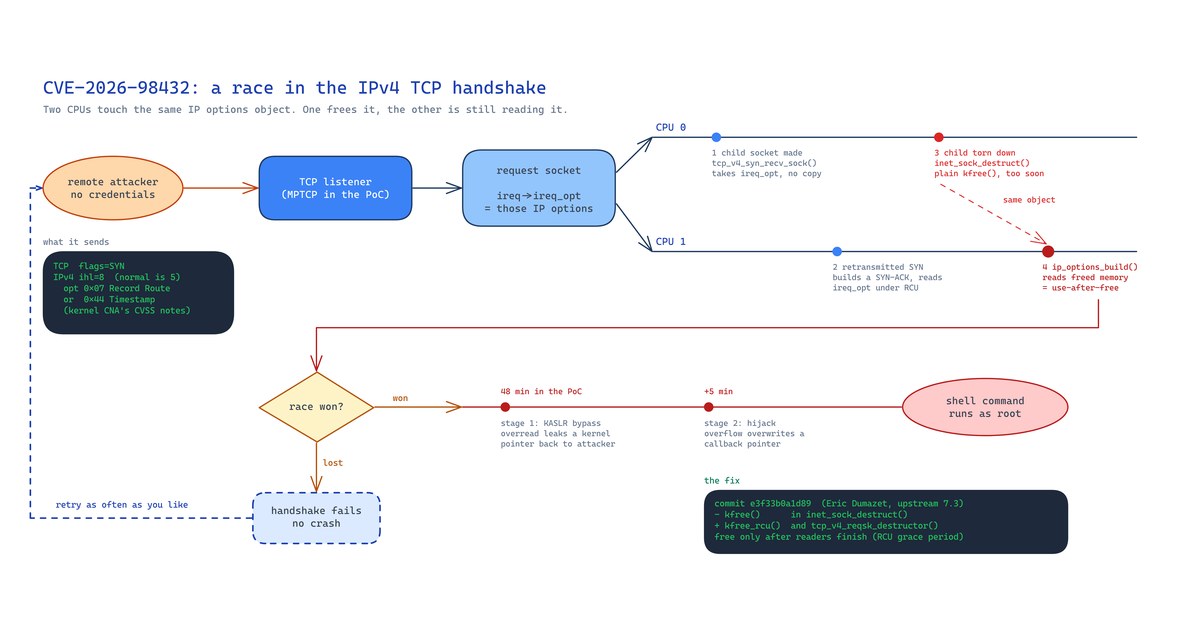
On 27 October Anthropic published an exploit chain that gets a root shell on a Linux server across the network, with no credentials and no clicks. The bug behind it is CVE-2026-98432, a use-after-free in the IPv4 TCP handshake. The kernel’s own CVE team scores it 9.8. Ubuntu has no fixed kernel yet.
I run an Ubuntu 22.04 VM in a colo that hosts a UniFi Network controller in Docker. When this landed I wanted three answers: is the box vulnerable, can I reduce the risk before Canonical ships a kernel, and has anything already been at it? This post is what I checked, what the first-party sources actually say, and the mitigations I tested.
Note: Everything here is as of 1 November 2026. The Ubuntu status will change, probably within days. Check the Ubuntu tracker entry before you act on the version numbers below.
What the bug is
The fix is a two-line change by Eric Dumazet, commit e3f33b0a1d89, “ipv4: free inet_opt and ireq_opt after an RCU grace period”. Xinyang Ge reported it.
When a SYN arrives carrying IPv4 options, the kernel stores those options on the request socket (ireq->ireq_opt). Once the handshake completes, tcp_v4_syn_recv_sock() hands that object to the new child socket without copying it. Meanwhile another CPU can be handling a retransmitted SYN for the same request, building a SYN-ACK and reading the same options under RCU. If the child is torn down in that window, inet_sock_destruct() frees the options with a plain kfree(), and the other CPU reads freed memory in ip_options_build().
The commit message says the same race exists in the request-socket migration path, which the net.ipv4.tcp_migrate_req sysctl turns on. The fix switches both frees to kfree_rcu(), so the memory isn’t released until every reader has finished.
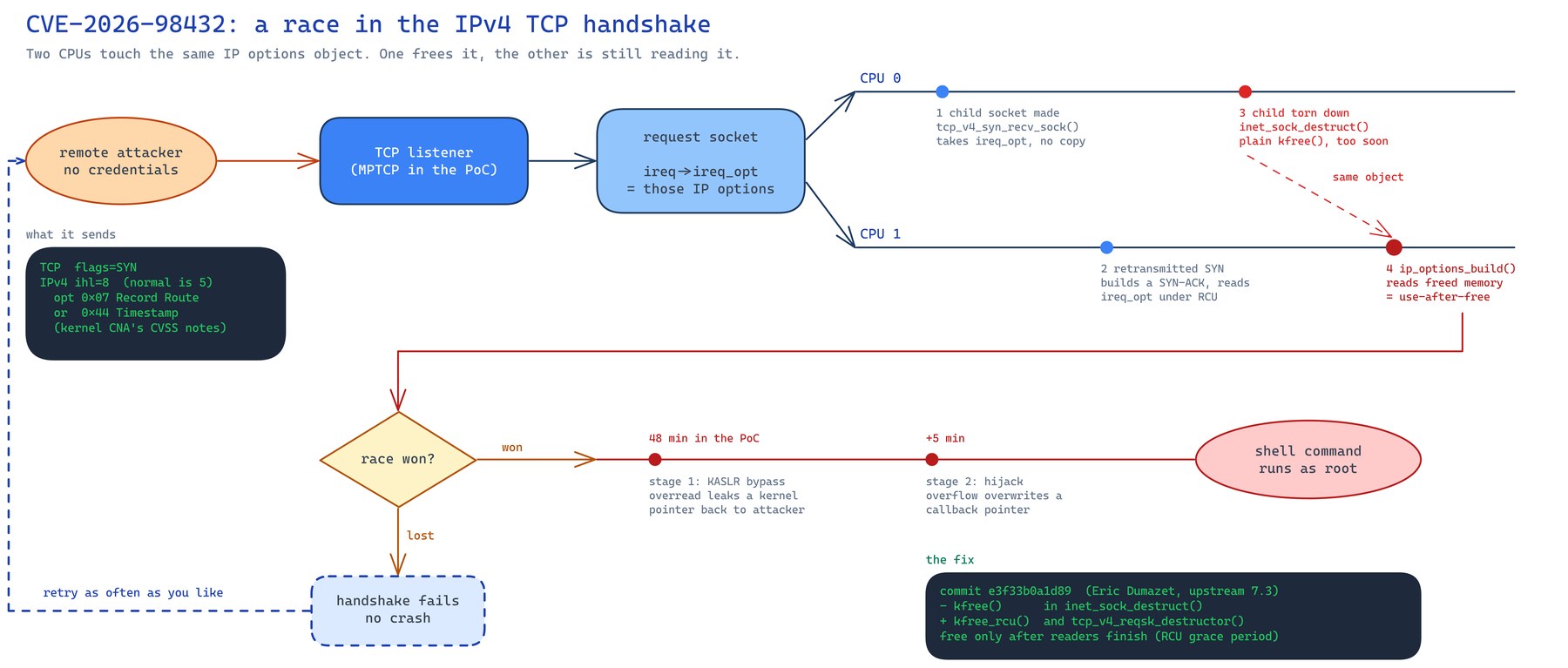
Two details make this worse than the average kernel UAF:
- The attacker controls the trigger. The CVE record from the kernel CNA describes “crafted TCP SYN packets with IPv4 Record Route or Timestamp options”. No login and no application bug are needed. It only needs a TCP port the attacker can reach over IPv4.
- Losing the race costs nothing. Anthropic’s write-up says “a lost race only fails the handshake without crashing the whole system”. An attacker can keep trying. Their proof of concept took “48 minutes to leak a kernel pointer and another five minutes to reach the shell command execution”.
IPv6 isn’t affected by the main issue, because tcp_v6_syn_recv_sock() copies the options instead of handing them over. The commit notes a separate IPv6 migration issue, to be fixed in its own patch.
Running your services in containers doesn’t help here. The bug is in the host kernel, so a payload that wins the race runs as root on the host, not inside your container.
Where MPTCP comes in
Multipath TCP lets one connection use several paths at once, for example Wi-Fi and mobile data together. On Linux an application opts in by creating its socket with IPPROTO_MPTCP. A plain TCP client can still connect to an MPTCP listener, because the server falls back to ordinary TCP. So an MPTCP listener looks like any other open port from the outside.
Anthropic’s post describes the exploit as letting “a remote attacker … send packets to Linux servers with a multipath TCP listener”. That’s the only precondition they state. They don’t say why the chain needs MPTCP, and I’m not going to guess.
The upstream commit and the CVE record don’t mention MPTCP at all. The Go security team’s advisory on oss-security spells out the gap: “the demonstrated exploit requires the target system to expose an MPTCP listener”, but “the underlying bug is not specific to MPTCP”. Disabling MPTCP blocks the published exploit. It doesn’t fix the bug, and someone may well find a route that skips MPTCP entirely.
Go 1.24 turned MPTCP on for you
Go’s involvement is why this reaches further than you’d expect. Since Go 1.24, net.ListenConfig uses MPTCP by default on Linux. The GODEBUG docs say the multipathtcp setting now defaults to "2", “enabled by default on listeners”. Any Go service built with 1.24 or later that listens the normal way is an MPTCP listener, unless its author turned that off.
That’s a long list in a typical homelab: Tailscale, containerd, Caddy, Traefik, most exporters, and plenty of single-binary tools. I checked my dev box:
sudo ss -Mlnp
State  Recv-Q Send-Q  Local Address:Port  Peer Address:Port Process
LISTEN 0      4096        127.0.0.1:1055       0.0.0.0:*    users:(("tailscaled",pid=1550549,fd=10))
LISTEN 0      4096  100.64.0.10%tailscale0:61434   0.0.0.0:*    users:(("tailscaled",pid=1543127,fd=27))
LISTEN 0      4096  100.64.0.10%tailscale0:3210    0.0.0.0:*    users:(("tailscaled",pid=1543127,fd=24))
LISTEN 0      4096  100.64.0.10%tailscale0:3211    0.0.0.0:*    users:(("tailscaled",pid=1543127,fd=26))
LISTEN 0      4096        127.0.0.1:35567      0.0.0.0:*    users:(("containerd",pid=1132,fd=14))
LISTEN 0      4096  100.64.0.10%tailscale0:5173    0.0.0.0:*    users:(("tailscaled",pid=1543127,fd=23))
...
That’s eleven MPTCP listeners I never asked for, all from tailscaled and containerd. They’re bound to loopback and the tailnet, so nothing on the internet can reach them, but I wouldn’t have known they were MPTCP without looking. If you’ve set up Home Assistant HTTPS over Tailscale like I did, run the same check on that box.
Note: Use
ss -Mon its own. If you combine it with-t(as inss -ltnM), you get the TCP sockets as well and the output looks like everything is MPTCP. That fooled me for a minute.
My UniFi VM had none. Docker 29’s port proxies there are built with Go 1.26, but they weren’t MPTCP, and the kernel counters showed zero MPTCP sockets.
Is your kernel affected?
Check the running kernel against your distro’s tracker, not against upstream version numbers. Distro kernels carry backports, so 5.15.0-202 on Ubuntu means nothing next to upstream 5.15.223.
uname -r
cat /etc/os-release | grep VERSION=
ls /var/run/reboot-required 2>/dev/null && echo "reboot pending"
Status on 1 November 2026, from the first-party trackers:
| Distro | Status |
|---|---|
| Ubuntu 26.04 LTS | Vulnerable, fix in progress in 7.0.0-43.43 |
| Ubuntu 24.04 LTS | Vulnerable, fix in progress in 6.8.0-149.149 |
| Ubuntu 22.04 LTS | Vulnerable, fix in progress in 5.15.0-203.213 |
| Ubuntu 20.04 LTS | Vulnerable |
| Debian 13 (trixie) | Fixed in 6.12.113-1, DSA-6568-1 |
| Debian 12 (bookworm) | Fixed in 6.1.190-1 (DLA-4841-1) and linux-6.12 6.12.113-1~deb12u1 (DLA-4850-1) |
| RHEL 8, 9, 10 | Critical, see RHSB-2026-016 |
Upstream, the CVE record lists the fix in stable 5.10.272, 5.15.223, 6.1.190, 6.6.159, 6.12.113, 6.18.56, 7.2.10 and in 7.3. Ubuntu rates it High priority. Its tracker doesn’t mention Livepatch, so don’t assume a no-reboot fix is coming.
My VM was on 5.15.0-202-generic, the newest jammy kernel available, with nothing pending in apt list --upgradable. Fully patched and still vulnerable. That’s the awkward bit.
Mitigations while you wait
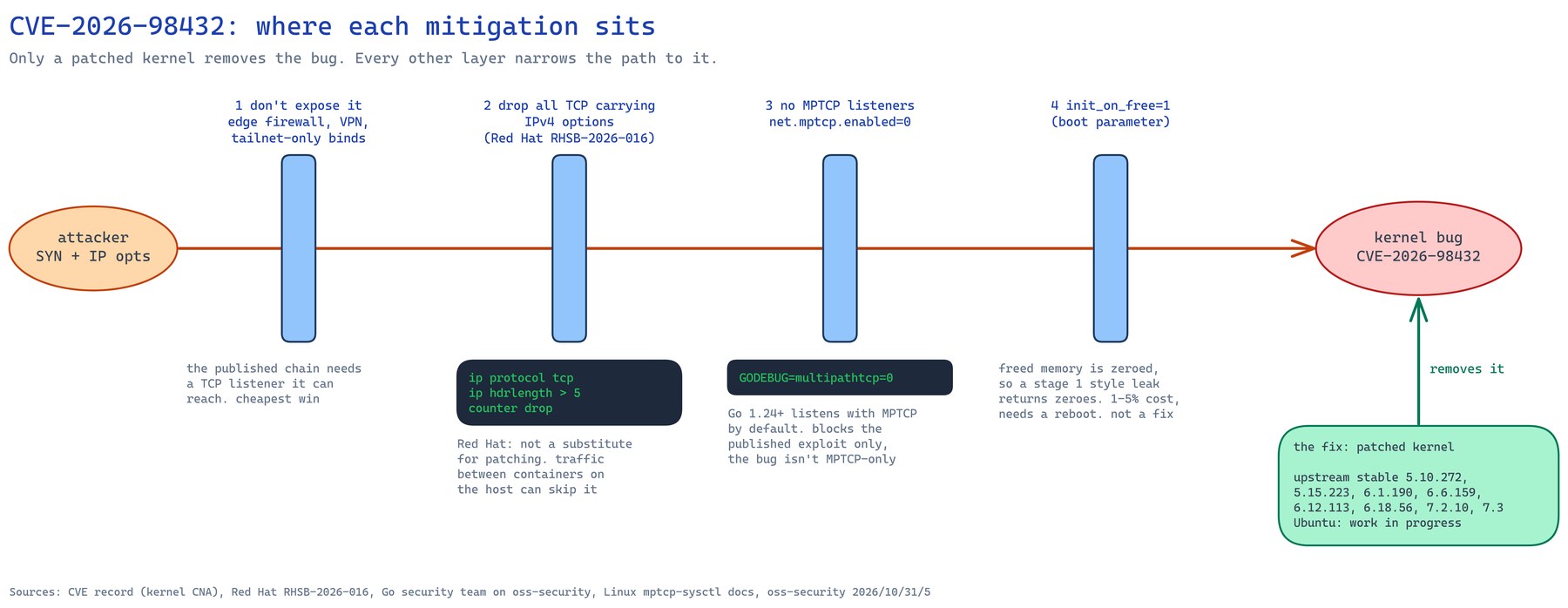
Every first-party source says the same thing first: patch the kernel. Red Hat puts it as “not a substitute for patching”. These layers buy time until Ubuntu’s kernel lands. They don’t replace it.
1. Cut down what can reach a TCP port
The exploit needs a TCP listener the attacker can reach over IPv4. Anything you can move behind a VPN or a tailnet, or bind to loopback, drops out of the picture. On a colo box I’d start by running ss -ltnp and asking, port by port, whether it needs to face the internet at all.
2. Drop TCP packets that carry IPv4 options
This is Red Hat’s interim mitigation from RHSB-2026-016. A normal IPv4 header is 5 words long (ihl=5). Anything longer carries options, and the trigger needs options. Save this as cve-2026-98432.nft:
table inet cve_2026_98432 {
    chain input {
        type filter hook input priority -310; policy accept;
        ip protocol tcp ip hdrlength > 5 counter drop
    }
}
Then check it and load it:
sudo nft --check --file cve-2026-98432.nft
sudo nft --file cve-2026-98432.nft
sudo nft list table inet cve_2026_98432
Priority -310 puts it ahead of conntrack and everything else on the input hook. On Ubuntu 22.04 and later, iptables is the nft backend, so this table sits alongside Docker’s rules without touching them. It isn’t persistent. Add it to /etc/nftables.conf if you want it to survive a reboot, and delete it once you’re on a fixed kernel:
sudo nft delete table inet cve_2026_98432
I wanted to see it work before trusting it on a remote box, so I tested it in a throwaway container with its own network namespace. Scapy sent five plain SYNs, five with a Record Route option and five with a Timestamp option:
# send-syns.py - run inside the test container
import sys
from scapy.all import IP, TCP, IPOption, send, raw, conf
conf.verb = 0
opts = {
    "none": b"",
    "rr":   b"\x07\x0b\x04" + b"\x00" * 9,    # Record Route, 2 slots, padded
    "ts":   b"\x44\x0c\x05\x00" + b"\x00" * 8, # Timestamp, 2 slots
}[sys.argv[1]]
p = IP(dst="127.0.0.1", options=[IPOption(opts)] if opts else []) / TCP(dport=8080, flags="S")
send(p, count=5)
print(sys.argv[1], "ihl", IP(raw(p)).ihl)
none ihl 5
  counter after none: packets 0
rr ihl 8
  counter after rr: packets 5
ts ihl 8
  counter after ts: packets 10
Plain SYNs went through untouched, and every SYN with options was dropped. My first attempt used Scapy’s default IPOption_RR(), which builds a malformed option. The kernel threw those packets away before they reached the input hook, so the counter stayed at zero. Build the options by hand if you want a meaningful test.
The caveats, in Red Hat’s words and from oss-security:
- It “reduces exposure but cannot fully prevent exploitation” (Red Hat), and it can break anything that genuinely needs IP options.
- The oss-security post points out it “can be bypassed by traffic between containers on the same host”. Container-to-container traffic gets forwarded across the bridge, so it never reaches the host’s input hook.
3. Turn off MPTCP
System-wide, as John Haxby suggested on oss-security:
sudo sysctl -w net.mptcp.enabled=0
echo 'net.mptcp.enabled = 0' | sudo tee /etc/sysctl.d/90-no-mptcp.conf
The kernel docs say this controls “whether MPTCP sockets can be created”, and it’s per network namespace. Haxby notes that newly started Go programs cope fine, but “running programs may have unexpected errors on new connections”. Restart your Go services afterwards rather than waiting for them to fail.
For a single Go service, the Go team’s options are GODEBUG=multipathtcp=0 in its environment, godebug multipathtcp=0 in the main module’s go.mod, or SetMultipathTCP(false) on the listener in code. They call per-program disabling “fragile”, because one forgotten listener leaves you exposed. The sysctl is the better hammer.
Afterwards, confirm with:
sysctl net.mptcp.enabled
grep MPTCP /proc/net/protocols | awk '{print $1, "sockets="$3}'
This only blocks the published exploit. It doesn’t fix the bug.
4. init_on_free=1
An oss-security post suggests the init_on_free=1 boot parameter. It zeroes memory when it’s freed, so the stage 1 style read of freed memory returns zeroes instead of whatever was there before. The author is clear it “does not fix this bug”, and quotes a cost of “roughly 1-5%” on workloads heavy in memory frees. My Ubuntu kernel turns on init_on_alloc by default but not init_on_free. Check yours:
grep -E 'INIT_ON_(FREE|ALLOC)_DEFAULT_ON' /boot/config-$(uname -r)
CONFIG_INIT_ON_ALLOC_DEFAULT_ON=y
# CONFIG_INIT_ON_FREE_DEFAULT_ON is not set
On Ubuntu, add it to GRUB_CMDLINE_LINUX_DEFAULT in /etc/default/grub, then run sudo update-grub and reboot. Since this one needs a reboot anyway, I’d rather spend that reboot on the fixed kernel when it lands.
Checking a box for signs of compromise
Nobody has published indicators of compromise for this CVE. Red Hat’s bulletin has no detection guidance, and Anthropic’s post doesn’t describe what a successful run leaves behind. What you can do is standard triage for a box that might have been rooted, plus a couple of checks specific to this bug.
Be clear about the limits. A losing race leaves no crash, and a winning one runs as root in kernel context. A careful attacker with root can hide from every check below. If the box held anything valuable and you have real reason to worry, rebuild it from known-good media.
Here’s what I ran on the VM.
Is anything speaking MPTCP, and has anyone tried? These counters reset at boot:
ss -Mln
nstat -az | grep -E 'MPTcpExtMPCapableSYNRX|MPTcpExtMPJoinSynRx'
Processes and parents. Look for anything you can’t explain, especially shells or interpreters whose parent is a network daemon or a kernel thread:
ps -eo user,pid,ppid,lstart,args --forest | grep -v '\[.*\]$'
ps -e --no-headers | wc -l; ls -d /proc/[0-9]* | wc -l   # should match
Kernel state:
cat /proc/sys/kernel/tainted          # 0 is what you want
sudo dmesg | grep -iE 'general protection|BUG:|Oops|ip_options|use-after-free'
lsmod | wc -l
Persistence:
cat /etc/ld.so.preload 2>/dev/null
sudo ls -la /var/spool/cron/crontabs /etc/cron.d
systemctl list-timers --all
find /etc/systemd/system /lib/systemd/system -newermt "-30 days" -type f
find /tmp /var/tmp /dev/shm -type f -perm -u+x
Package integrity. dpkg --verify compares installed files against package checksums. Ignore lines marked c (config files):
sudo dpkg --verify | grep -v ' c /'
On Ubuntu 22.04 and later, dpkg -S won’t find /usr/bin/systemctl, because the package owns it as /bin/systemctl (merged /usr). Don’t panic when a “files not owned by any package” sweep lights up with half of systemd.
Accounts and keys:
awk -F: '$3==0 || $7 !~ /(nologin|false)/' /etc/passwd
sudo ls -la --time-style=full-iso /root/.ssh/authorized_keys /home/*/.ssh/authorized_keys
zgrep -h "Accepted" /var/log/auth.log* | grep -oE "from [0-9a-f.:]+" | sort | uniq -c
Containers. Check that nothing runs privileged, nothing mounts the Docker socket, and the image layer hasn’t picked up anything strange:
docker inspect -f '{{.Name}} priv={{.HostConfig.Privileged}} caps={{.HostConfig.CapAdd}}' $(docker ps -q)
docker inspect $(docker ps -q) | grep -i docker.sock
docker diff <container> | grep -vE '^(C|A) /(config|data|tmp|run|var/log)'
docker top <container>
Outbound connections:
sudo ss -tnp state established
The service itself. If something on the box faces the internet, read its access log for requests that got a 200 response and shouldn’t have. Expect noise. Any public port gets a steady stream of Mozi, Struts and path traversal probes. What you’re looking for is anything that wasn’t a 404 or 400.
My VM came back clean on all of it. The containers weren’t privileged and had no socket mount, and the controller runs as a non-root user. No unknown processes, users, keys, cron entries or units, and dpkg --verify was clean. The kernel wasn’t tainted. SSH logins only came from the jump host I use, and the controller has a single admin account. None of that proves a negative, but it’s what I’d expect from a box nobody has touched.
If you keep the nftables rule from earlier, its counter doubles as a crude detector. I’d expect it to sit at or near zero on a normal server. A climbing count means something is sending crafted packets your way.
A tangent about patch cron jobs
While I was looking at persistence on the VM, I found the job that does its patching: a root crontab entry from 2021 that runs apt-get upgrade -y and then reboot now, every day at 05:00, whether anything changed or not. It also turned out the VM’s clock steps back about 25 minutes during boot before NTP corrects it. So on 1 November cron saw 05:00 twice and the box rebooted twice. My guess is VMware Tools time sync fighting NTP, but I haven’t confirmed it.
When Ubuntu’s fixed kernel lands, that job will install it and reboot onto it within a day, so for this CVE it’s doing its job. For new boxes I’d use unattended-upgrades with its own reboot setting instead, which only reboots when /var/run/reboot-required says so:
// /etc/apt/apt.conf.d/50unattended-upgrades
Unattended-Upgrade::Automatic-Reboot "true";
Unattended-Upgrade::Automatic-Reboot-Time "05:00";
What I’d do, in order
- Patch the kernel and reboot as soon as your distro ships the fix. On Ubuntu that’s
5.15.0-203,6.8.0-149or7.0.0-43, depending on release. Debian already has fixed kernels. Confirm withuname -rafter the reboot. - Until then, check what’s listening. Run
ss -ltnpandss -Mlnp, and move anything that doesn’t need the internet behind a VPN or tailnet. - Set
net.mptcp.enabled=0unless you know you use MPTCP, then restart your Go services. - Load Red Hat’s nftables rule on anything internet-facing, and watch its counter.
- Run the triage checks on any box that had a public TCP port open while it ran a vulnerable kernel.
- Remove the nftables table and decide about the sysctl once you’re on the fixed kernel.
Sources
All first-party:
- CVE-2026-98432 record (kernel CNA, published 15 October 2026, CVSS 3.1 9.8)
- Upstream fix, commit e3f33b0a1d89
- Ubuntu CVE tracker
- Debian security tracker
- Red Hat CVE page and RHSB-2026-016
- NVD entry (not yet scored by NVD at the time of writing)
- Anthropic: Discovering and exploiting vulnerabilities in critical, real-world software with Claude (27 October 2026)
- Go security team on oss-security, plus replies 30/6 and 31/5
- Go 1.24 release notes and GODEBUG history
- Linux kernel MPTCP sysctl documentation
I took the CVE explainers I found through search as leads only. Every number and quote above comes from the pages listed. Here’s how I check that kind of research before acting on it.
A fully patched box that’s still vulnerable
The part that stuck with me is that apt had nothing to give my VM. It was on the newest kernel Canonical ships and still exposed. In the gap between a CVE and a distro kernel, the useful work is knowing what’s listening, and I found eleven MPTCP listeners on my dev box I’d never have guessed at. If you only run one command from this post, make it sudo ss -Mlnp.
Or just hand this page to your agent
If you’d rather have an agent do the checking, paste this into Claude Code or whatever you use on the box:
Read https://exitcode0.net/posts/linux-kernel-tcp-cve-2026-98432-mptcp-mitigation/ and check this machine for CVE-2026-98432.
First, read-only: report the running kernel against the Ubuntu or Debian tracker for this CVE, list every TCP and MPTCP listener with its process, show net.mptcp.enabled and the MPTCP counters, and run the compromise triage checks from the post. Report findings before changing anything.
Then ask me before each change: loading the nftables table (tell me if anything here might rely on IPv4 options, and never touch an existing ruleset), setting net.mptcp.enabled=0 (list which running services I'd need to restart), adding init_on_free=1, and any reboot. If I'm connected over SSH, make sure a reboot or firewall change can't lock me out before you do it.
The page gives the agent the commands, the nftables rule and the tracker links. What it can’t know is which of your listeners should face the internet, whether anything you run uses MPTCP on purpose, and when a reboot is acceptable. Those are your calls. You’ll get a list of every MPTCP socket on the box in about a minute.
Enjoy. ✌️