Home Assistant’s own Assist can already turn a light on. It matches your sentence against a list of templates and runs the one that fits. Say something it has no template for and you get “Sorry, I couldn’t understand that”.
Point Assist at an LLM and that stops being true. “It’s too dark in the living room” works. The catch is that the model has to call Home Assistant’s tools correctly, and plenty of local models can’t. I ran three models against the same 18 commands to see which ones can.
The setup is the second half of the stack from my local voice post. That post covers the ears and mouth, Whisper and Piper. This one is the brain. The model server is the container from Ollama in a Proxmox LXC.
The short version
| Model | Commands that changed the right device | Median time | Slowest |
|---|---|---|---|
| qwen3.5:9b | 18 of 18 | 2.0 s | 3.7 s |
| gemma4:12b | 17 of 18 | 2.0 s | 6.8 s |
| gemma4:e2b | 6 of 18 | 0.7 s | 1.8 s |
Nine commands, run twice each, on a 12 GB RTX 3060. I judged each run by the state of the device afterwards, not by what the model said. That distinction matters, and I’ll come back to it.
The numbers are small and the devices are Home Assistant’s demo ones, so treat this as a ranking, not a benchmark. The gap between the top two and the bottom one is not subtle.
What you need
- Home Assistant 2026.10.1. I used the Docker image, as in the voice post
- An Ollama server that Home Assistant can reach over the network. It needs
OLLAMA_HOST=0.0.0.0:11434, which the Ollama post sets - A model that supports tool calling.
ollama show <model>liststoolsunder capabilities if it does - Some entities exposed to Assist
I used Home Assistant’s demo: integration for the devices. Add demo: to configuration.yaml and you get six lights (including RGB ones), three thermostats, locks and a garage door, with no hardware.
Step 1: add the Ollama integration
Go to Settings, Devices & services, Add integration, Ollama. Give it the server URL, for example http://<ollama-host>:11434. The API key field is optional, and mine stayed blank.
Home Assistant reaches out from its own container, so the Ollama host has to be reachable from there. On the LAN, mine was, with no extra routing. If your Ollama container is on a tailnet and Home Assistant is too, the tailnet name works the same way, for example http://ollama-lxc:11434. I tested the LAN address, not the tailnet one.
Step 2: add a conversation agent
The integration page now has an Add conversation agent button. Each agent is one model with its own settings, and you can add as many as you like and compare them. I added three:
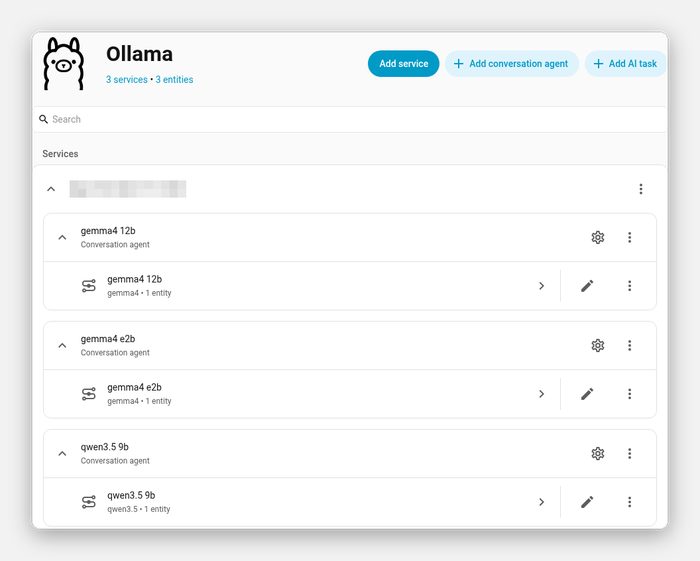
The settings that matter:
- Model. Pick one that’s already pulled on the server.
- Control Home Assistant. Turn on the Assist API. Without it the model can chat but can’t touch a device.
- Context window. I set 8192. My Ollama server defaults to 32768, which uses more VRAM. The value in the agent overrides the server default, and
ollama psshowed 8192 once Home Assistant was talking to it. - Think. Off. A thinking model works out loud before answering and the extra seconds don’t help here.
I created the agents through Home Assistant’s config flow API for the test, so I haven’t read the labels off the UI form. The options are model, prompt, the Assist API, context window, max history, keep-alive and think.
Step 3: put it behind an assistant
Under Settings, Voice assistants, Add assistant, choose the conversation agent you just made:
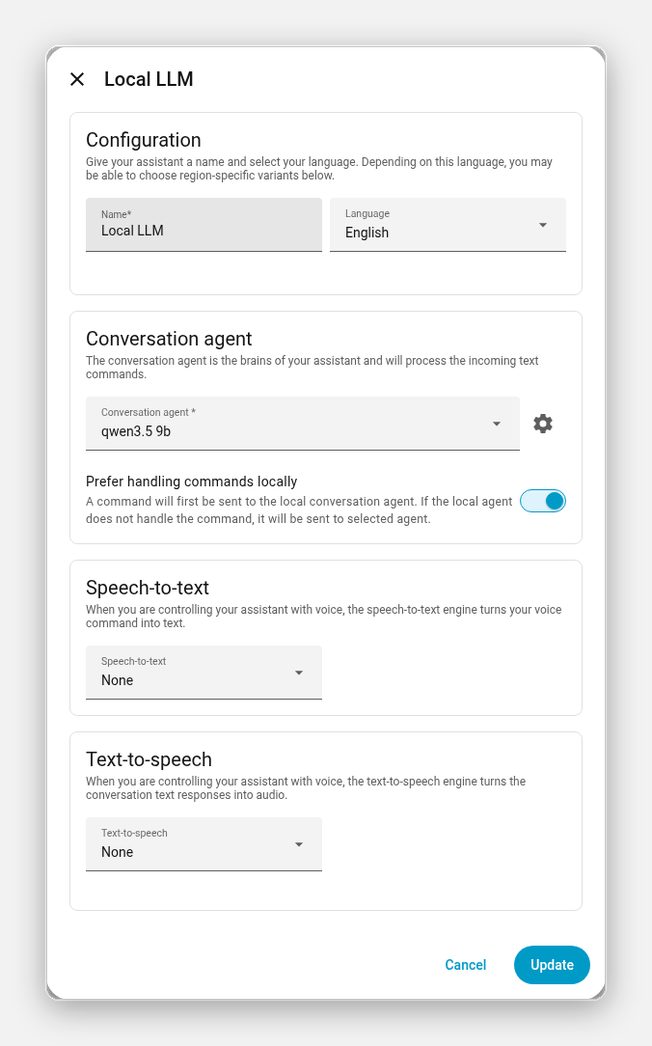
I left speech-to-text and text-to-speech as None so this test isolates the LLM. To add voice, pick Whisper and Piper from the voice post.
Leave “Prefer handling commands locally” on
With that toggle on, Home Assistant tries its built-in matcher first and only falls back to the LLM if nothing matches. I timed the same four commands both ways, using the pipeline’s intent stage:
| Command | Matcher first | LLM only |
|---|---|---|
| “turn on the bed light” | 0.1 s | 1.9 s |
| “set the kitchen lights to 30 percent” | under 0.1 s | 2.0 s |
| “is the front door locked?” | 1.7 s | 1.6 s |
| “it’s too dark in the living room” | LLM | LLM |
Two of the four never reach the LLM. The lock question went to the model either way, and the vague request had no template to match, so it went there too.
So the LLM only has to be good at the sentences the templates can’t handle. That’s a smaller job, and it’s the reason a 9B model is enough.
Step 4: expose the entities
Assist only sees what you’ve exposed. Settings, Voice assistants, Expose has the list. The model sees names and states only, so names that make sense out loud matter more than anything else you can tune.
Test it
Open Assist and talk to it:
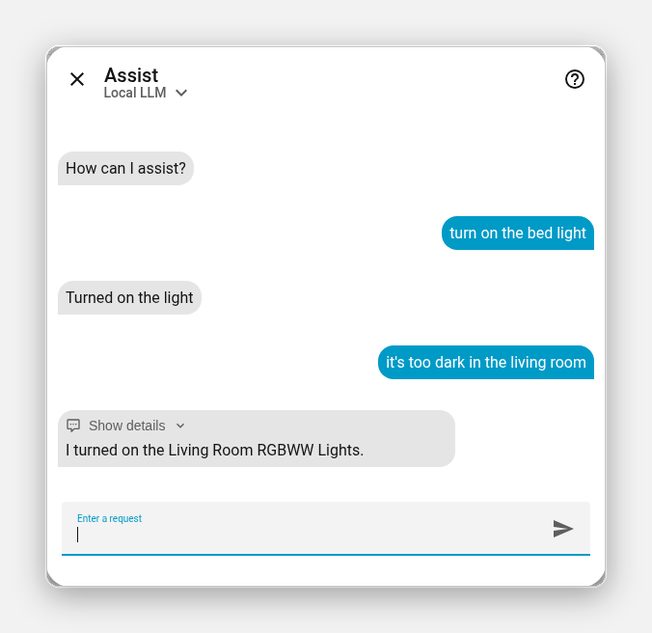
The short “Turned on the light” is the built-in matcher. The longer reply is the model. You can tell which handled a command by how it phrases the answer.
Which model
Per command, across the two runs:
| Command | qwen3.5:9b | gemma4:12b | gemma4:e2b |
|---|---|---|---|
| turn on the bed light | 2 of 2 | 2 of 2 | 0 of 2 |
| set the kitchen lights to 30 percent | 2 of 2 | 2 of 2 | 0 of 2 |
| make the office light blue | 2 of 2 | 2 of 2 | 0 of 2 |
| turn off all the lights | 2 of 2 | 2 of 2 | 0 of 2 |
| is the front door locked? | 2 of 2 | 2 of 2 | 2 of 2 |
| set the heat pump to 23 degrees | 2 of 2 | 2 of 2 | 2 of 2 |
| open the garage door | 2 of 2 | 2 of 2 | 0 of 2 |
| it’s too dark in the living room | 2 of 2 | 1 of 2 | 0 of 2 |
| turn on the entrance light and the bed light | 2 of 2 | 2 of 2 | 2 of 2 |
The small model gets questions and thermostat commands right and fails on almost everything else. The 9B and 12B models are close, and the 9B one is a little faster and uses less VRAM: 5.6 GB loaded at 8192 context, against 8.1 GB for the 12B, as reported by ollama ps. The 12B’s one miss was a reply of “Unable to get response”, which I didn’t dig into.
I’d start with qwen3.5:9b. On this test set I couldn’t find a reason to pay for the bigger one.
For raw speed, this is what each model does with a plain prompt on the same card, at my server’s 32768 default context:
| Model | Generation | Prompt processing |
|---|---|---|
| gemma4:e2b | 128 tokens/s | 1,289 tokens/s |
| qwen3.5:9b | 53 tokens/s | 448 tokens/s |
| gemma4:12b | 38 tokens/s | 437 tokens/s |
Four things that went wrong
The reply isn’t evidence
I told gemma4:e2b to turn off all the lights. It answered “All the lights have been turned off.” Two of the six were still on. I confirmed it by reading the states directly afterwards.
If you’re testing models for this, check the device. A model that fails at calling the tool will often describe a success anyway.
The small model filters by an area you don’t have
On gemma4:e2b, “set the kitchen lights to 30 percent” came back with “I could not find the ‘Kitchen Lights’ entity in the ‘Kitchen’ area”. The Kitchen area exists in the demo, but none of the lights are assigned to it. The model turned the name into an area filter, so the search found nothing. For “make the office light blue” it said the Office area didn’t exist, which is true. I didn’t assign entities to areas, so I can’t say whether that would have rescued it.
Once, the reply was the tool call itself, printed as text: intent__HassTurnOn{name:<|"|>Bed Light<|"|>,domain:[<|"|>light<|"|>]}. If you ever see that in a reply, the model isn’t compatible enough.
The first request after a model swap takes about 20 seconds
My Ollama server has OLLAMA_MAX_LOADED_MODELS=1. Loading the 9B model after the 12B had been in memory made the first request take 20.5 seconds. After that the same vague request took between 1.4 and 5.6 seconds. If one assistant uses one model, you only pay it once. With keep-alive set to forever, as on my server, it stays resident. Mixing models costs a reload each time.
Two seconds is without the voice
The LLM path took about 2 seconds for simple commands with no voice in the loop. Speech-to-text goes before it and text-to-speech after, and I haven’t timed the whole path with the model in the middle. Matcher-first keeps the common commands fast, so only the odd request waits for the model.
What this doesn’t cover
- Real hardware. Demo entities have clean names and no quirks. A house full of devices with names like “Lamp 2” will do worse.
- Voice. I tested text. Whisper mishearing a word, as it did in the voice post, will hit the LLM too.
- Security devices. Home Assistant doesn’t expose locks and alarms to Assist by default. I exposed a lock for the test. Think before you do that in a real house, because a misheard sentence can reach it.
- More models. I only tested what was already on the server.
Wrap-up
I expected the 12B model to beat the 9B one and it didn’t. What surprised me more was how little the LLM has to do once the built-in matcher takes the easy sentences. If you’ve tried a small model, watched it fail and written the whole idea off, try a 9B one with that toggle on before you decide.
Or just hand this page to your agent
If you’d rather not click through it, give the page to your coding agent:
Read https://exitcode0.net/posts/home-assistant-ollama-conversation-agent-local-llm/ and set up a local Ollama conversation agent in my Home Assistant. Before touching anything, check that my Ollama server is reachable from Home Assistant, which models it has pulled and whether they support tools, which entities are currently exposed to Assist, and whether any of them are locks or alarms. Don't expose a security device without asking me. After setup, test five commands and check the device state afterwards instead of trusting the reply.
The page gives the agent the settings, the toggle and the test method. Only you know which entities are safe to expose and what your Ollama server is called.
Enjoy. ✌️