A Home Assistant voice assistant needs three parts. Something to turn speech into text, something to turn a reply back into speech, and Assist in the middle to work out what you meant. The first two can run on plain CPU in Docker, so nothing you say has to leave the house.
I built the whole stack from scratch on 11 October 2026 on Home Assistant 2026.10.1, ran text and spoken commands through it, and timed the result. This post has the compose file, the settings, the numbers and the two things that tripped me up.
If you only want one half, I’ve already covered them separately: Wyoming Whisper for speech-to-text and Wyoming Piper for text-to-speech. This is the wiring post that joins them to Assist.
What you need
- Docker with the Compose plugin
- About 1.5 GB of free RAM. Measured while idle after a command: Home Assistant 360 MB, Whisper (
base-int8) 480 MB, Piper 280 MB - A browser on the same network
No GPU. I ran this on a shared, CPU-only Docker host.
Step 1: one compose file for all three
Save this as compose.yaml in an empty directory:
services:
  homeassistant:
    image: ghcr.io/home-assistant/home-assistant:stable
    ports:
      - "8123:8123"
    volumes:
      - ./ha-config:/config
    environment:
      - TZ=Europe/London
    restart: unless-stopped

  wyoming-whisper:
    image: rhasspy/wyoming-whisper
    volumes:
      - ./whisper-data:/data
    command: ["--model", "base-int8", "--language", "en"]
    restart: unless-stopped

  wyoming-piper:
    image: rhasspy/wyoming-piper
    volumes:
      - ./piper-data:/data
    command: ["--voice", "en_GB-alba-medium"]
    restart: unless-stopped
Then create the config folder and start it:
mkdir -p ha-config && printf 'default_config:\n' > ha-config/configuration.yaml
docker compose up -d
docker compose logs -f wyoming-whisper wyoming-piper
Wait for both Wyoming services to say they’re ready. The first start downloads the Whisper model and the Piper voice, so it takes a minute.
The Wyoming containers don’t publish any ports. Home Assistant reaches them by service name over the compose network, which also means nothing else on your LAN can talk to them.
Note: My test run differed in two ways. I capped each container’s memory so it wouldn’t squeeze the other things on that host, and I didn’t publish 8123, because I reached Home Assistant by its container address. Neither changes how the stack behaves.
Step 2: add both Wyoming services
Open http://<your-host>:8123, create your user, then go to Settings, Devices & services, Add integration and pick Wyoming Protocol. Do it twice:
| Service | Host | Port |
|---|---|---|
| Whisper | wyoming-whisper | 10300 |
| Piper | wyoming-piper | 10200 |
Home Assistant now has a faster-whisper speech-to-text entity and a piper text-to-speech entity. I drove this step through Home Assistant’s config flow API rather than clicking, since I was scripting the test. It’s the same flow the UI uses.
Step 3: build the voice assistant
Go to Settings, Voice assistants, Add assistant and fill it in like this:
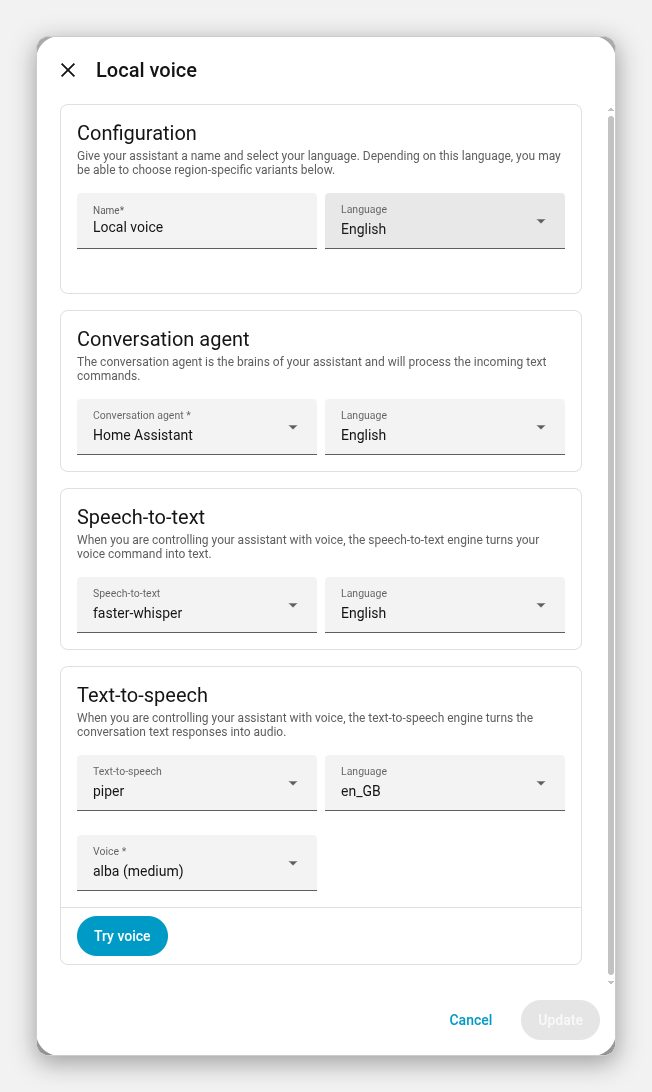
- Conversation agent: Home Assistant. This is the built-in intent matcher. It needs no LLM and handles “turn on”, “turn off” and “what’s the temperature” style commands.
- Speech-to-text: faster-whisper, English
- Text-to-speech: piper,
en_GB, voice alba (medium)
Set it as the preferred assistant so every Assist dialog uses it.
If you want an LLM behind it, this is the slot where it goes. Ollama is the obvious choice, and I’ll cover wiring it in as a follow-up.
Step 4: expose something to control
Assist only touches entities you’ve exposed to it. Under Settings, Voice assistants, Expose, switch on the lights and switches you want to control.
I used a toggle helper called “Kitchen lamp” so I didn’t need real hardware. That’s why the reply below says “switch”, not “light”.
Step 5: test it
Open the Assist dialog and type a command:
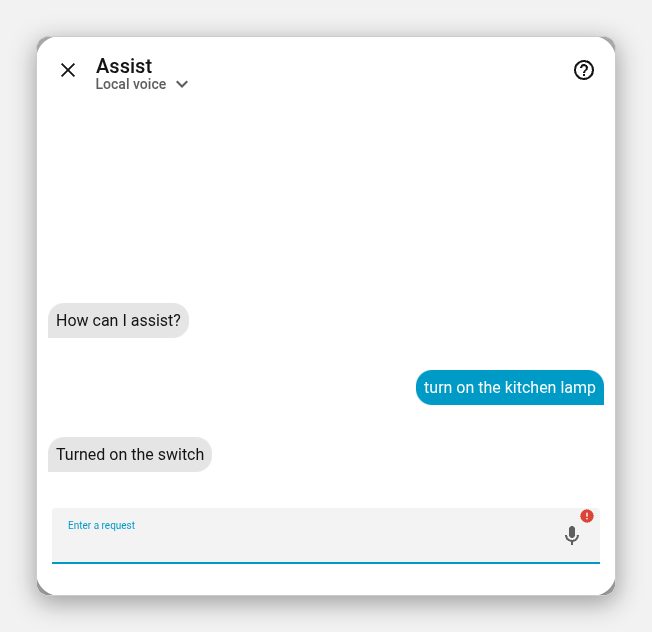
Typing skips Whisper, so this proves the intent matcher and Piper only. Piper rendered the reply to audio too. From command to finished reply took 1.4 seconds.
To test Whisper properly I sent a recorded phrase down Home Assistant’s assist_pipeline/run websocket call with the pipeline’s speech-to-text stage as the start. The clip was 1.5 seconds of synthesised speech, so it’s a clean best case. Whisper transcribed it, Assist turned the lamp on and Piper produced the spoken reply, all in 0.6 seconds from the first audio byte. A real microphone in a noisy kitchen will be slower and less accurate.
Two things that went wrong
Whisper heard “lights” and Assist took it as an area
My first spoken test said “turn on the kitchen light”. Whisper base-int8 returned “turn on the kitchen lights”. Assist read “kitchen” as the Kitchen area, found nothing it could switch in it, and failed.
Nothing was broken. Plural versus singular is exactly the sort of difference that a small Whisper model flips on short phrases. Two fixes work, and I’d do both:
- Name entities something an area name can’t collide with. I renamed mine from “Kitchen light” to “Kitchen lamp”. The next run matched first time.
- If accuracy matters more than speed, move up a model. My Whisper post has measured speeds for
tinythroughmedium.
The microphone button fails over plain HTTP
Click the microphone in the Assist dialog on http://192.168.x.x:8123 and nothing records. In my browser the dialog printed [object Object] as the reply:
![Home Assistant Assist dialog showing an [object Object] message after clicking the microphone over plain HTTP](/images/ha-assist-microphone-error-http.jpg)
The cause is the browser, not Home Assistant. Browsers only expose navigator.mediaDevices on a secure context, which means HTTPS or localhost. I checked in the console and isSecureContext was false on the LAN address, so there was no microphone API to call.
Typed commands still work over HTTP. For voice you need HTTPS. The cleanest way I know on a LAN is Tailscale, and I’ve written that up in Home Assistant TLS with Tailscale.
What this stack can’t do yet
There’s no wake word here, so you press the microphone or a satellite button. And “turn on the kitchen lamp” works because the phrase matches a template. Ask it something open-ended and the built-in agent says it doesn’t understand. That’s the gap an Ollama conversation agent fills, and it’s the next post in this series. The Ollama in a Proxmox LXC build is the server I’ll point it at.
Troubleshooting
- Wyoming integration says it can’t connect. Check the container names match what you typed, and that you’re using the compose network, not
localhost.docker compose psshows whether both are running. - No transcription at all. Read the Whisper logs first. It has to finish downloading its model before it accepts audio.
- Whisper keeps mishearing short commands. See the plural trap above, then try a bigger model.
Wrap-up
The part I didn’t expect was how little of this is Home Assistant. The compose file is twenty-odd lines, and both traps were outside it: a model guessing one letter wrong, and a browser refusing the microphone. If you hit the mic problem first, you’ll spend an hour blaming Wyoming. Don’t.
Or just hand this page to your agent
If you’d rather not copy and paste, give your coding agent the page:
Read https://exitcode0.net/posts/home-assistant-local-voice-whisper-piper-docker/ and set up a local Home Assistant voice stack with Whisper and Piper using Docker Compose. Before you touch anything, check whether Home Assistant already runs here, which port 8123 is bound to, how much free RAM there is, and whether I'm serving it over HTTPS. Don't overwrite an existing compose file or Home Assistant config. Show me the diff first.
The page gives the agent the compose file, the settings and the failure modes. Only you know where Home Assistant runs, which entities should be exposed and whether your browser reaches it over HTTPS.
Enjoy. ✌️