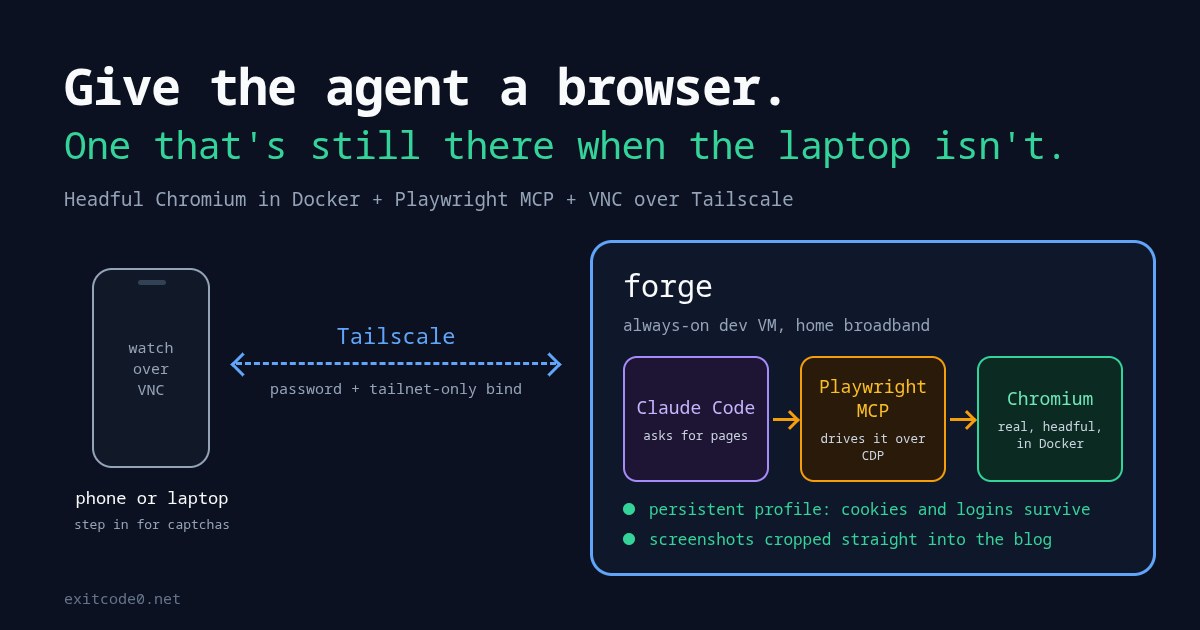
Diagram of a phone watching over VNC via Tailscale while Claude Code drives Playwright MCP and a Chromium container on an always-on dev VM

How to Give Claude Code a Real Browser: Headful Chromium in Docker with Playwright MCP

A couple of weeks ago I asked Claude, via the Chrome extension on my Windows laptop, to find me the best-value used M1 MacBook Air on eBay. It was properly good at it. It searched with sensible filters, opened listings, read the descriptions for battery cycle counts and “cracked screen” small print, and left the three best tabs open for me to look through. Then I tried to picture doing the same from my phone on a day I’ve left the laptop at home, talking to the agents on my always-on dev VM. There’s no browser there. Claude Code’s web fetch tool gets blocked or served a stripped-down page by most retailers, eBay included. So I gave the VM its own browser: a real, headful Chromium in a Docker container. Claude drives it through Playwright MCP, I can watch and take over from my phone over VNC, and it’ll crop screenshots straight into this blog. Every image in this post came out of it, the cover included. ...
September 25, 2026 · 16 min · Tom Cocking
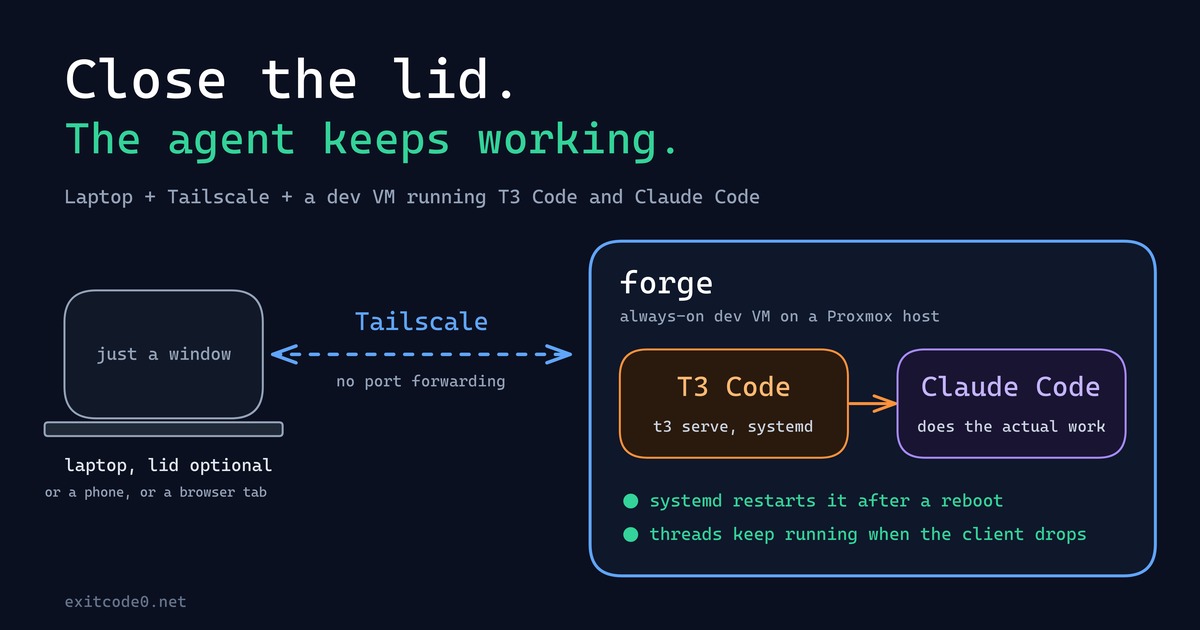
Diagram showing a laptop connecting over Tailscale to a persistent dev VM running T3 Code and Claude Code

How I Turned My Laptop Into a Dumb Terminal With a Tailscale Dev VM, T3 Code, and Claude Code

For about as long as I’ve been doing this, my laptop has been the computer: the IDE, the Docker daemon, forty browser tabs, all of it running locally, all of it dying the second the battery does or the lid has to close for a meeting. That model finally broke this year - not because of some clever trick, but because I moved the actual computer off the laptop entirely. The laptop’s job now is to open a window onto a machine that never sleeps, never loses its state, and honestly doesn’t care what OS it’s running. ...

September 24, 2026 · 9 min · Tom Cocking

Running Ollama in a Proxmox LXC with NVIDIA GPU Passthrough

Running large language models locally is genuinely useful — no API costs, no rate limits, and your data stays on your own hardware. The catch is getting GPU acceleration working inside a Proxmox LXC container, which involves a few non-obvious steps around driver installation and cgroup device passthrough. Why LXC and not a VM? VM GPU passthrough wasn’t an option here — no iGPU meant the host would have had no display output once the card was handed off. LXC was the practical solution, and it turns out to be a good one anyway: containers share the host kernel directly, so the GPU stays bound to the host’s NVIDIA driver and the container accesses it via bind-mounted device nodes and cgroup permissions. On top of that, LXCs are lighter weight than VMs, with less overhead and near-instant startup times. For a dedicated service like Ollama, it’s a solid fit. ...

March 22, 2026 · 11 min · Tom Cocking

Automating Postgres Deployment with Docker Compose and Init Scripts

Introduction to Running PostgreSQL in a Docker Container using Docker Compose In this blog post, we will explore how to run PostgreSQL in a Docker container using Docker Compose. We will also break down and explain the init-user-db.sh script that is executed at startup to initialize the PostgreSQL tables. Running PostgreSQL in a Docker container provides several benefits, including ease of deployment, portability, and isolation. So let’s dive in and understand the process! ...

January 6, 2024 · 5 min · Tom Cocking

Running Uptime Kuma With Docker Compose

Introduction Uptime-Kuma is an open-source, self-hosted website monitoring tool. It can check the uptime and response time of websites, APIs, and other services at regular intervals and alert you if any of them go down. Uptime-Kuma can be installed on your own server and customized to suit your needs. In this article, we will explore how to set up and run Uptime-Kuma using Docker Compose. The Docker Compose File The following is the Docker Compose file for the Uptime-Kuma service: ...

May 1, 2023 · 2 min · Tom Cocking

Writing to an InfluxDB server with Python3

A quick GitHub gist for anyone looking to write to an InfluxDB server with Python3. This is a generic function that accepts three inputs; as an example, I am using temperature data in degrees Celsius. Turning DHT11 readings into beautiful graphs in Grafana Once you have your data in influxDB, a great way to visualise it is using Grafana. I hope to bring you more posts in the future about visualising your python data with Grafana. ...

January 19, 2021 · 1 min · Tom Cocking

Setup the Nextcloud Snap Package with HTTPS and a separate data path

https://snapcraft.io/nextcloud I have been using the Nextcloud snap package for a long time, but some recent system changes in my colocation facility mean that it is time for a big upgrade. Rather than migrate my existing Nextcloud instance, I have decided to build a new install and here are my goals for the new installation: Use lets encrypt to have automatic and valid HTTPS certificates Have the data path for Nextcloud on a HDD and the rest of the host OS on an SSD. Host OS Details For this setup, I am using Ubuntu 18.04 installed on a 30GB SSD backed partition. I then have a 1TB disk attached and mounted to /media. ...

March 29, 2020 · 3 min · Tom Cocking

Backup Nextcloud with RCLONE

I’ve made previous posts about backing cloud services with RCLONE – Backup Google Photos with Rclone – and this post will detail how to backup a self-hosted cloud service, Nextcloud. Get started with Nextcloud There are a lot of benefits to running your own private ‘cloud’ storage system, but for me, my top concern is privacy and Nextcloud gives me the ability to take accountability for my own data. With this in mind, I am conscious of my Nextcloud server going offline or suffering data loss, so I want a way to create 1 or more backups of my datacentre hosted, Nextcloud data on my home NAS. ...

February 27, 2020 · 2 min · Tom Cocking

Backup Google Photos with Rclone

Google photos auto backup is a nice way to make sure that all your photos on your mobile phone are backed up. It takes the pain out of backups by allowing you to automatically upload your photos and videos to Google servers. For those who would also like an offline copy of those photos, it is now easy to automate this. Here is how to backup your Google Photos library to your local computer or NAS with Rclone. ...

January 31, 2020 · 3 min · Tom Cocking