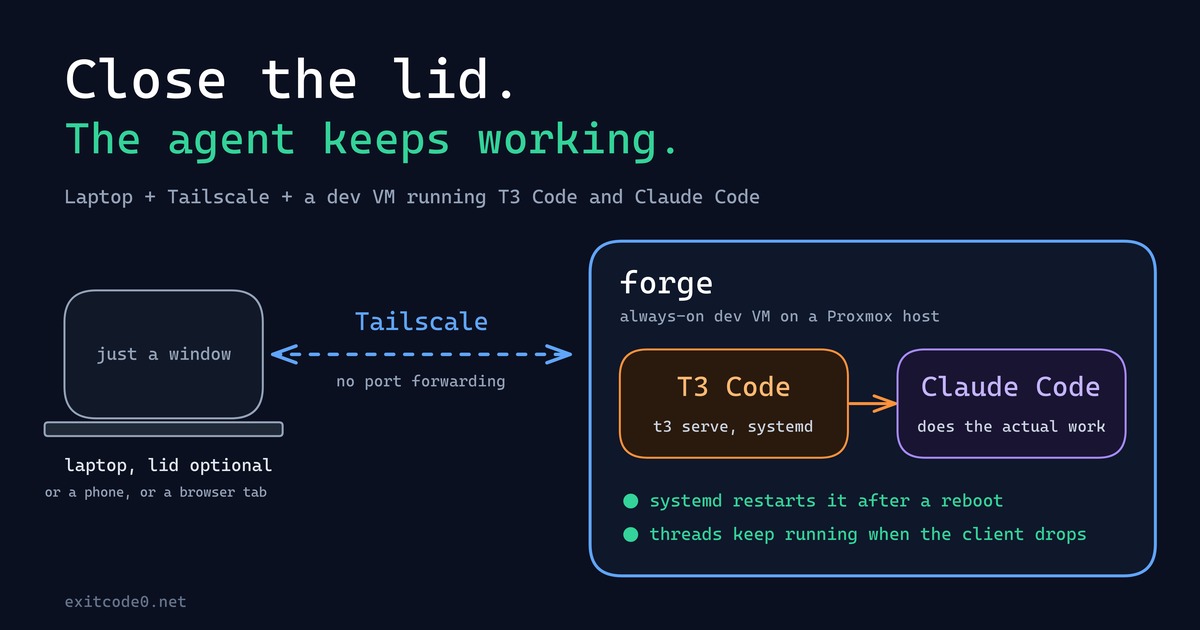
Diagram showing a laptop connecting over Tailscale to a persistent dev VM running T3 Code and Claude Code

How I Turned My Laptop Into a Dumb Terminal With a Tailscale Dev VM, T3 Code, and Claude Code

For about as long as I’ve been doing this, my laptop has been the computer: the IDE, the Docker daemon, forty browser tabs, all of it running locally, all of it dying the second the battery does or the lid has to close for a meeting. That model finally broke this year - not because of some clever trick, but because I moved the actual computer off the laptop entirely. The laptop’s job now is to open a window onto a machine that never sleeps, never loses its state, and honestly doesn’t care what OS it’s running. ...

September 24, 2026 · 9 min · Tom Cocking

Running Ollama in a Proxmox LXC with NVIDIA GPU Passthrough

Running large language models locally is genuinely useful — no API costs, no rate limits, and your data stays on your own hardware. The catch is getting GPU acceleration working inside a Proxmox LXC container, which involves a few non-obvious steps around driver installation and cgroup device passthrough. Why LXC and not a VM? VM GPU passthrough wasn’t an option here — no iGPU meant the host would have had no display output once the card was handed off. LXC was the practical solution, and it turns out to be a good one anyway: containers share the host kernel directly, so the GPU stays bound to the host’s NVIDIA driver and the container accesses it via bind-mounted device nodes and cgroup permissions. On top of that, LXCs are lighter weight than VMs, with less overhead and near-instant startup times. For a dedicated service like Ollama, it’s a solid fit. ...

March 22, 2026 · 11 min · Tom Cocking

How to Migrate VMs Between Standalone Proxmox Nodes Without Clustering

Moving virtual machines between Proxmox hosts is straightforward when you have a cluster configured, but what if you’re running standalone nodes? This guide walks through the process of migrating VMs between two independent Proxmox servers on the same network, without needing to set up clustering. [IMAGE: Diagram showing two Proxmox servers on a flat LAN with an arrow indicating VM migration between them] I recently needed to migrate several VMs from an older Proxmox host to a newer one with faster storage. Both systems were on the same network but not clustered, and I wanted to avoid the overhead of downloading backup files through the GUI. The solution? Streaming backups directly over SSH using Proxmox’s built-in vzdump tool. ...

February 15, 2026 · 7 min · Tom Cocking

Passing Through an NVMe Drive to an ESXi Virtual Machine

Note: Broadcom completed its acquisition of VMware in November 2023 and discontinued the free ESXi hypervisor tier. The steps in this article remain technically valid for licensed VMware vSphere. If you’re running a home lab, Proxmox VE is a capable free alternative worth considering. ESXi is a powerful hypervisor that allows for the virtualization of multiple operating systems on a single physical machine. However, there are times when you may need to pass through a physical device, such as an NVMe drive, to a virtual machine. In this blog post, we will explore the steps required to pass through an NVMe drive to an ESXi virtual machine. ...

May 4, 2023 · 3 min · Tom Cocking

Running Uptime Kuma With Docker Compose

Introduction Uptime-Kuma is an open-source, self-hosted website monitoring tool. It can check the uptime and response time of websites, APIs, and other services at regular intervals and alert you if any of them go down. Uptime-Kuma can be installed on your own server and customized to suit your needs. In this article, we will explore how to set up and run Uptime-Kuma using Docker Compose. The Docker Compose File The following is the Docker Compose file for the Uptime-Kuma service: ...

May 1, 2023 · 2 min · Tom Cocking

Unraid USB Controller Passthrough - VM hot swap USB

For the longest time, I have been running VMs on my Unraid server and had the need to passthrough USB devices. I will be the first to admit that I have too many computers and a shrink might classify it as an addition. Coupled with my quest for a clutter-free desk, I have been faced with the issue of swapping USB devices like a keyboard and mouse, from one machine to another Unraid virtual machine (vm). ...

March 3, 2021 · 3 min · Tom Cocking

Collect bitcoin price data with python and Coinbase

Cryptocurrencies have been back on the popular agenda lately, thanks mostly to the surging value of Bitcoin. I have been interested, but not massively invested in cryptocurrency for many years. If I had the courage to buy and hold all those years ago, I might be writing to you from a beach – I assure you, this is not the case! I have been getting into InfluxDB lately and its fantastic ability to store heaps of time series data. Well, using python and Coinbase, I am going to show you how to collect bitcoin (and other crypto assets) price data and store it in InfluxDB… then we are going to make some neat panels in Grafana to help us realise our data. This is going to be a longer write up than most, so here is here are links to each section: ...

February 2, 2021 · 6 min · Tom Cocking

How to Pass Through a Physical Drive to an UNRAID VM (and Keep an Existing Windows Install)

I recently migrated my ‘physical’ Windows 10 desktop to a ‘virtual’ machine running under UNRAID (libvert). This is a quick guide on how I was able to use my existing installation on a SSD and pass it through to a VM. Why passthrough a drive to a VM? In some cases, it might be beneficial to start from scratch when creating a Windows 10 VM on UNRAID, creating a new virtual disk and having a fresh install. I chose to take an alternative path because I was contempt with my Windows install as it was. I had my Steam/Epic Games library downloaded onto one of the two disks already in the system and a number of applications installed and configured just the way I like them. ...

December 12, 2020 · 3 min · Tom Cocking

Copy Paste in vSphere before installing VMware tools

I’ve spent enough time building VMs in vSphere to know that the first few minutes between starting the VM and getting VMware Tools installed is agonising. Similar to my ‘Copy Paste With Powershell Sendkeys‘ script, I have another tool written in AutoIT which sends defined keyboard strokes to the system. So this is not exactly ‘copy paste in vSphere’, but it achieves the same goal. If you actually want to enable clipboard sync between host and VM, you can follow this guide here: Enable Copy and Paste Operations Between the Guest Operating System and Remote Console. This is going to need VMware Tools installed on the host though. ...

May 18, 2020 · 2 min · Tom Cocking

Backup Nextcloud with RCLONE

I’ve made previous posts about backing cloud services with RCLONE – Backup Google Photos with Rclone – and this post will detail how to backup a self-hosted cloud service, Nextcloud. Get started with Nextcloud There are a lot of benefits to running your own private ‘cloud’ storage system, but for me, my top concern is privacy and Nextcloud gives me the ability to take accountability for my own data. With this in mind, I am conscious of my Nextcloud server going offline or suffering data loss, so I want a way to create 1 or more backups of my datacentre hosted, Nextcloud data on my home NAS. ...

February 27, 2020 · 2 min · Tom Cocking